


 Kobo
Kobo| Introduction | Ejecting |
| Kobo Readers | How to Buy a Kobo eBook |
| Shopping | Adobe Digital Editions |
| Advantages of Kobo WiFi | Borrowing a Kobo eBook from the Library |
| Disadvantages of Kobo | Links |
| Setup |
Above link takes MasterCard, Visa and PayPal
An eBook reader system. It is the most popular brand in Canada. You can rent Kobo readers at libraries to read library eBooks or books you buy or download. They look like a Kindle touch. Kobo also sells software that also runs on Android, iPad, iPhone devices. It has software to share comments with other readers.
Kobo keep coming out with new models with slightly different features, renaming them and discontinuing the old models. As of 2013-11-23, the models is ascending order of deluxeness are the Kobo Touch, the Kobo Glo, Kobo Aura and Kobo Aura HD, or Kobo ARC series. When you pay more money you get either a bigger screen or a backlit screen or colour. You can get them at Chapters-Indigo or at the link at the top. I would think most people would want the Aura and Aura HD. The Touch and Glo are a bit too small. Their reader has 2GB of storage, USB (Universal Serial Bus) and WiFi (Wireless Fidelity) connectivity. It comes in Lilac, Blue, Silver and Black.
It supports ePub (Electronic Publishing), PDF (Portable Document Format), JPEG (Joint Photographic Experts Group) , GIF (Graphic Interchange Format), PNG (Portable Network Graphics) , BMP (Bitmap), TIFF (Tagged Image File Format) , TXT, HTML (Hypertext Markup Language) , RTF (Rich Text Format), MOBI (Mobile pocket eBook format) , CBZ, CBR.
They have an online store selling eBooks for about $4 with over 1 million free eBooks. They have an affiliate program managed by Linkshare.com.
| Four Types of Kobo e-Book Readers | |||
|---|---|---|---|
| Model | Appearance | Cost
|
Key Features |
| Kobo Mini | 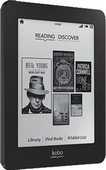 |
5” diagonal touch screen. Flipping a page takes about 2 seconds. The screen goes black during the flip, which is irritating. This is more of an issue than you might think. You can read very rapidly because the length of the line is intermediate between a newspaper column and a paperback book. Your eye naturally takes in an entire line at a pop without strain. The lines are well separated. So I would estimate you waste about 25% of your time waiting for the next page to show up because you have to flip pages far more often than you do a paper book. There is also about a 5 second delay when you first start reading a book as it is loaded from slow secondary memory to primary RAM (Random Access Memory). This is quite acceptable. 2 GB holds 1,000 eBooks. Holds up to 10,000 eBooks with a 32 GB SD Memory Card that plugs into slot on the top. Black and white e-ink that works in bright sunlight. Connects with WiFi or USB. The ad copy touts that the back is quilted. You might think this means it is soft and padded. This is not so. It just means there is a diamond pattern embossed into the plastic back. Maybe the higher end models are soft. The unit is remarkably thin and light. The power button is on the top right edge. I took me quite a while to find it. It is confusing since all buttons make the light flash even when the unit is off. The screen tells you to press it to turn the unit on, but don’t tell you where it is. It comes with an onboard manual. It is all pretty straight forward. I was surprised to discover you have to manually set up the date and time, like a microwave. I guess there was not enough room in such a tiny unit to build in time discovery. diagonal: 12.70 cm (5 in) 600 × 800 pixels, 7.60 × 10.20 cm (2.99 × 4.02 in) manual. | |
| Kobo Touch | 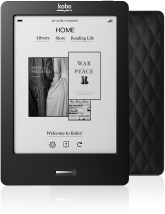 |
6” diagonal screen size. Touch pad with virtual keyboard. Wired Magazine’s 2012 Editor’s Pick for Best eReader. 2 GB holds 1,000 eBooks. Holds up to 30,000 eBooks with a 32 GB SD Memory Card. Black and white e-ink that works in bright sunlight. Connects with 802.11b/g/n WiFi or USB. diagonal: 15.20 cm (5.98 in) 600 × 800 pixels, 9.10 × 12.20 cm (3.58 × 4.80 in). When I compared Kobo, Sony and Kindle, side by side, Kobo and Sony were sharper. manual | |
| Kobo Glo | 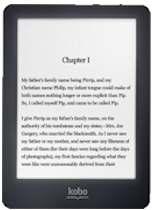 |
6” diagonal screen size. Touch pad with virtual keyboard. 2 GB holds 1,000 eBooks. Holds up to 30,000 eBooks with a 32 GB SD Memory Card. Backlit screen. Connects with USB or 802.11b/g/n WiFi or USB . diagonal: 15.20 cm (5.98 in) 600 × 800 pixels, 9.11 × 12.20 cm (3.59 × 4.80 in). Contains dictionary and translator. Battery charge lasts one month. You tap the screen quite hard to flip to the next page. The process is almost instantaneous. It has two buttons on the top, the left to turn on the backlight and the right to power on/off. I would rather have buttons than a touch screen. With the touch screen, your tap often does not take or counts twice. manual | |
| Kobo Arc | 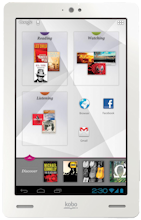 |
7” diagonal screen size. Colour screen. 64 GB. Runs Android apps. Full open access to Android 4.0 (Ice Cream Sandwich). Web browsing. Email. Has a built-in camera. Connects with WiFi 802.11 b/g/n and Micro USB. Choice of three fonts. Not a cellphone. No cellphone data connectivity. Though runs Skype via WiFi. Does not take voice commands. diagonal: 17.80 cm (7.01 in), 600 × 1024 pixels, 9 × 15.30 cm (3.54 × 6.02 in) manual. | |
They also have an online bookstore called Kobobooks.com that sells eBooks. They have one affiliate program, run by Rakuten/Linkshare. The online bookstores gives you free previews. These are useless. They just let you look at the first 5 pages or so of a book that have no content, just copyright info, how to contact the publisher etc. Romance novels and books that could not otherwise get published predominate. The Vox has been replaced by the Arc.
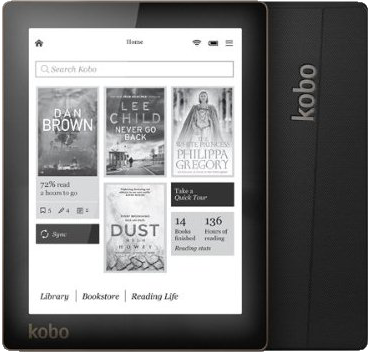 |
recommend electronic⇒Kobo Aura Digital Text Reader | |||||||||||||||||||||||||||||||||||||||||||||
| asin | B00EV95GNC | |||||||||||||||||||||||||||||||||||||||||||||
|---|---|---|---|---|---|---|---|---|---|---|---|---|---|---|---|---|---|---|---|---|---|---|---|---|---|---|---|---|---|---|---|---|---|---|---|---|---|---|---|---|---|---|---|---|---|---|
| dim | 15 × 11.40 × 0.81 cm 5.91 × 4.49 × 0.32 in | |||||||||||||||||||||||||||||||||||||||||||||
| Light lets you read in the dark. manual. details. | ||||||||||||||||||||||||||||||||||||||||||||||
| ||||||||||||||||||||||||||||||||||||||||||||||
| Greyed out stores probably do not have the item in stock | ||||||||||||||||||||||||||||||||||||||||||||||
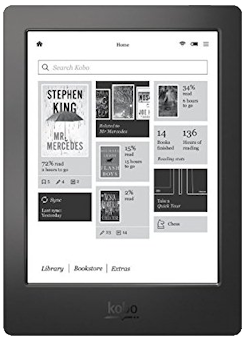 |
recommend electronic⇒Kobo Aura H2O, 6.8-Inch, Comfort Light, Water Resistant E-Reader (Black) | |||||||||||||||||||||||||||||||||||||||||||||
| asin | B00N9ZVN90 | |||||||||||||||||||||||||||||||||||||||||||||
|---|---|---|---|---|---|---|---|---|---|---|---|---|---|---|---|---|---|---|---|---|---|---|---|---|---|---|---|---|---|---|---|---|---|---|---|---|---|---|---|---|---|---|---|---|---|---|
| dim | 17.90 × 12.90 × 0.97 cm 7.05 × 5.08 × 0.38 in | |||||||||||||||||||||||||||||||||||||||||||||
| 4 GB on-board memory, holds up to 3,000 eBooks. details. | ||||||||||||||||||||||||||||||||||||||||||||||
| ||||||||||||||||||||||||||||||||||||||||||||||
| Greyed out stores probably do not have the item in stock | ||||||||||||||||||||||||||||||||||||||||||||||
I was given a red Kobo Glo as a gift. The setup is appalling. Here are a few of the problems:
You are supposed to go through an eject process before disconnecting the cord
between your computer and the Kobo. You can’t do this from the Kobo touch
screen. In Kobo Desktop, running on your PC (Personal Computer), click the Eject icon
 at the top right of the screen. Then you can unplug. However, often the icon is not there.
I have not discovered how to coax it out of hiding. Alternatively, click start ⇒ Computer. Right click the
Kobo reader device. Click Eject.
at the top right of the screen. Then you can unplug. However, often the icon is not there.
I have not discovered how to coax it out of hiding. Alternatively, click start ⇒ Computer. Right click the
Kobo reader device. Click Eject.
The easy way to buy a book is to plug in your Kobo and start up the desktop Kobo app. It is pretty straightforward. The only catch, is you must use a credit card, not PayPal. The app remembers your account, password, address etc. The book appears in your library on local hard disk. From there it automatically gets synched into the Kobo.
To buy a book from the Kobo store, visit the site, set up an account with Password, select your book and put it in your virtual shopping basket. Click checkout and pay by credit card or PayPal. They don’t send you anything. They simply put the eBook in your online library. Plug in your Kobo into a USB port and start the Kobo Desktop software. If you don’t have the software, you can download it here:

Login to Kobo and it will automatically download all your books into your Kobo including the freebies.
If you want a separate copy for your desktop,
click on the
 icon in the upper
right of the Kobo bookstore, then click my library.
Your book will be there. Click:
icon in the upper
right of the Kobo bookstore, then click my library.
Your book will be there. Click:
next to your newly purchased book. It will have a ridiculous long gibberish name. It is probably best not to disturb it. If it is DRM (Digital Restrictions/Rights Management) free, you can read it with any sort of reader, including a software reader that runs on the desktop.
Books at the Kobo bookstore are not copy protected. However, when you borrow eBooks from the library or you acquire eBooks from other sources they may be. For that, you need Adobe Digital Editions. For some reason, the standard Kobo software will not let you import unprotected PDF files. However, the Adobe software will do that. You must first authorise your computer by getting Adobe to assign your eReader a serial number. For that you need to first create an AdobeID account. The digital Editions app then can then optionally modify documents to run only on that particular Kobo. You drag your eBooks or PDF files onto the Adobe app (not copy/paste). It does not have an auto-sync. So you must then right click to copy them into your Kobo. This is so Mickey Mouse. The two programs should be merged into one seamless consistent whole.
Arbitrary PDFs will not work as well as PDF eBooks. The type may be too small or the pages too wide to fit.
You have a chicken and egg problem. You need to load the Kobo manual into the Kobo before you have much hope of learning how to load a document into the Kobo. These instructions will get you started.
This process could be simplified:
The process of borrowing an eBook from the Victoria public library has been simplified. It is still obscenely complicated. Grandmothers can borrow paper books without trouble. This rigamarole to borrow an eBook taxes the talent of a computer consultant:
This process could be simplified:
Video on how to borrow a book with Kobo


 |
This page is posted |
http://mindprod.com/bgloss/kobo.html |
Optional Replicator mirror
|
J:\mindprod\bgloss\kobo.html | |
 |
Please read the feedback from other visitors,
or send your own feedback about the site. Contact Roedy. Please feel free to link to this page without explicit permission. | |
| Canadian
Mind
Products
IP:[65.110.21.43] Your face IP:[216.73.217.43] |
| |
| Feedback |
You are visitor number | |


