

| Introduction | Partitioning |
| Windows Machine | Server Machine |
| Former Machine | My First Personal Computer |
| OCR | My First Computer |
The upgrade was much more traumatic than I expected. It turned out my Acer motherboard, case and power supply all had proprietary quirks. They did not take well to being mixed with generic components. I had to buy a new case, power supply and DVD (Digital Video Disc) burning that I did not originally intend. The bright side is I have an almost complete second working computer. To go, a new Kinesis Keyboard.
| Roedy’s Green’s Upgrade in Progress Configuration | ||||||||||||||||||||||||||||||||||||||||||||||||||||||||||||||||
|---|---|---|---|---|---|---|---|---|---|---|---|---|---|---|---|---|---|---|---|---|---|---|---|---|---|---|---|---|---|---|---|---|---|---|---|---|---|---|---|---|---|---|---|---|---|---|---|---|---|---|---|---|---|---|---|---|---|---|---|---|---|---|---|---|
| Equipment | Size/Speed | Brand | Model | Description | Comments | |||||||||||||||||||||||||||||||||||||||||||||||||||||||||||
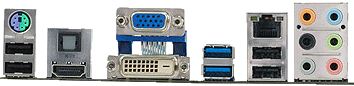
| motherboard | 4 PCI (Peripheral Component Interconnect) slots | Asus | M5A88-M | This board packs maximal punch into a small µATX form factor. It has an Am3+ socket for CPUs (Central Processing Units) up to 140 watts, I am using an FX-6100 to keep the power usage/heat down. They recommend a 450+ watt power supply. Up to 16 Gig of DDR-3 1866MHz RAM (Random Access Memory) (not counting overclocking). 4 slots of 4 Gig each (non ECC (Error Correcting Code), dual port). 6 SATA-3 ports, 2 USB-3, 6 USB-2, 1 x PCIe 2.0 x16, 2 x PCIe 2.0 x1, 1 x PCI. The weakness of the board is the integrated ATI (Array Technology Inc) Radeon HD 4250 GPU (Graphics Processing Unit) which has no RAM of its own. It uses a gig of your system RAM. Specifications. Download manual. You would probably upgrade if needed with a separate Video card in the PCIe x16 slot. It comes with heat sinks for both the support chips. 2, 4 or 8-channel audio. It has what they call a Q-connector which lets you plug and unplug all the case-mounted LEDs (Light-Emitting Diodes) in one fell swoop, even though the case does not directly support the Q-connector. The back panel supports 4 USB-2 ports, 2 USB-3 ports, 1 Ethernet 1 Gb, 1 DVI (Digital Video Interface) port, 1 HDMI (High-Definition Multimedia Interface), 1 S/PDIF (Sony/Philips Digital Interconnect Format) port without internal cabling. The software and drivers come in Windows versions only. It comes with 2 SATA-3 internal cables period!. You get have to get internal cabling elsewhere for: 4 SATA-3 ports, 1 serial port, 1 LPT port, 8 USB-2 ports. The USB-2 ports need 9-pin female connectors. There are no PATA (Parallel ATA) ports. It is made in China. The workmanship looks first class.
I have installed hundreds of motherboards and this one is by far the most complex. Happily most of the options have an intelligent auto setting. However, the manual gives very little explanation of what the options do. They typically have documentation of the form: [enable]=enable the skurtlewax feature, [disable]=disable the skurtlewax feature. It has a number of utilities with overlapping function. Many refused to install. Some did not work. I was underwhelmed. Oddly I could find nothing to help me configured the video, not even the amount of main RAM it borrows. You must set the CORE UNLOCKER switch to enable both on the motherboard and in the BIOS (Basic Input Output System) to allow use of more than one of the CPU (Central Processing Unit) cores. The BIOS alarmed me be saying I had only 8 gig of RAM installed when I had 16. Windows however, reported the full 16. Sata Ports
Ports 1-4 are AHCI and ports 5 and 6 are IDE (Integrated Development Environment). The connectors are arranged like this:
| ||||||||||||||||||||||||||||||||||||||||||||||||||||||||||||
| CPU | 3.3 GHz | AMD (Advanced Micro Devices) | X-6100u | socket Am3+ | Six cores. L1 Cache Size : 48K, L2 Cache Size : 6MB total 1MB per core, L3 Cache Size : 8MB. I expected with
3 times faster CPUs, 3 times as many cores and 5
times as much RAM, that the speed would blow my hair
out. Not so. Psychologically, it is not that much different. The main difference is background tasks
don’t slow down foreground tasks. I suspect the problem is two fold:
| |||||||||||||||||||||||||||||||||||||||||||||||||||||||||||
| DDR-3 RAM | 16 GB | Corsair | CMZ16GX3M4A1600C9 | 16 gig
4 × 4 Mb DDR-3 1600 dual ported, not buffered, not ECC. |
4 slots, 240 pin DIMM (Dual In-line Memory Module) The disabled onboard video steals one of the 16 gigs of RAM. I could have bought 1866 MHz RAM, but it is 50% more expensive. Possibly Corsair CMZ16GX3M4A1600C9 Vengeance 16GB Pc12800 DDR3 RAM - 1600MHz, 4x4096MB, Non-ECC, Unbuffered, dual channel. | |||||||||||||||||||||||||||||||||||||||||||||||||||||||||||
| Video card | 2 GB | Zotac | Zotac NVidia GeForce GT 640 | 65 watts, 2 gig DDR3, Max resolution 2560 × 1600, 128-bit. | It has a Windows experience index of 7.1, It has HDMI, DVI-D (Digital Video Interface — Data), DVI-I (Digital Video Interface — Integrated) and a converter to make the DVI-I into VGA. Ports are labeled! It has no S/PDIF, composite or s-video. It is made in China. The workmanship looks excellent. It does not need an extra power connector. Core Clock: 900 MHz, Memory Clock: 1782 MHz, 384 Stream Processors. 128-bit. DirectX 11. It did not make much difference other than artifacts going away when rendering Java, which was my main motivation for the upgrade. It has been discontinued. | |||||||||||||||||||||||||||||||||||||||||||||||||||||||||||
| pair of DVD/CD Reader/Writers | SATA | LG | HL-DT-ST GH24NSCO | 24 × Can handle R+DL and R-DL, though I have never tried it. I have the pair hooked up hooked up as my R: and S: drive. My American Megatrends BIOS told me the drive could not be detected, but I just configured it, and it magically appeared on the next boot. These two were chosen by the repair person. They did not get a very good review. My previous pair died when I spilled coffee or juice on them. The doors would not open. Now I know why they failed, perhaps I can resurrect them. Fix for Insufficient Space on Blank DiscsIf software to write on your CD/DVD says there is insufficient space to write on every blank disc, here is how to fix it:
| ||||||||||||||||||||||||||||||||||||||||||||||||||||||||||||
| case | µATX (Advanced Technology Extended) tower | no name | no name | ATX | It has a polite feature, two sets of mounting holes. If you lose the screws, you have twice the odds of finding some replacement screws what will fit. | |||||||||||||||||||||||||||||||||||||||||||||||||||||||||||
| µ ATX power supply | 500 watts | Cooler Master | Extreme Power Plus | I chose this power supply partly because it comes with 15, count-’em connectors. This gives be the flexibility to add pretty well any new or legacy peripherals. Unfortunately, it has only three SATA connectors, now all in use. To add more SATA I will need adapters. It has a honking huge fan and intelligent fan controller. It is Energy Star compliant. | ||||||||||||||||||||||||||||||||||||||||||||||||||||||||||||
| integrated video | 500 MHz | ATI | Integrated Radeon 4250 | It borrows 1 MB of system RAM. It has no V-RAM of its own. It supports Crossfire, so I later add a video card it can act as an aux processor. Up to 1920 × 1200. Supports Direct X 10.1. Connectors for HDMI and DVI-D. | ||||||||||||||||||||||||||||||||||||||||||||||||||||||||||||
| hard disk | 1 TB | Western Digital Caviar Green 1TB Hard Drive | Caviar Green WD10EZRX | 3.5 Inch, 32 MB Cache, 7200 RPM (Revolutions Per Minute), SATA 6 Gb/s. | It arrived 2012-04-27. It was easy to set up. I just connected the SATA power and data connectors, booted and used Boot-It Bare Metal to copy the partitions from my old drive to the new. The RPM is variable. It speeds and slows depending on load to lower power consumption. The fans drown out any noise it makes. It calculates optimum seek speeds to lower power consumption, noise and vibration. It arranges that the heads arrive from the seek just as the data rotates into place, not unnecessarily sooner, thus minimising energy consumed for the seek. Other than the silence, the main improvement I noticed was faster console displays. I am not sure why that would be. specifications. jumper settings. The 8 pins for jumpers normally have no jumpers on them. You might mistake them for some sort of male pin connector. It comes without any cables, screws or mounting hardware. Partitioned using NTFS (New Technology File System) C: D: E: F: G: | |||||||||||||||||||||||||||||||||||||||||||||||||||||||||||
| Integrated Sound | 8 Chanel | Realtek | ALC892 | The analog sound connectors on the back are colour coded, but have no labels or icons. You need to memorise
the colour code.
| ||||||||||||||||||||||||||||||||||||||||||||||||||||||||||||
| Flat Screen LCD (Liquid Crystal Display) monitor | 24” | Samsung | SyncMaster 2443BW | Energy Star rated, with PowerSaver logic | The good:
When you first use each video resolution, including the VESA (Video Equipment Standards Association) boot mode, press auto to automatically adjust the screen size and position. | |||||||||||||||||||||||||||||||||||||||||||||||||||||||||||
| recycled DSK Keyboard | Ergonomics | Kinesis | Classic QD | Dvorak layout keyboard | Unusual, very expensive DSK/QWERTY keyboard. Supports firmware keystroke macros and layout remapping without software. I tried a programmable foot pedal so that I can hit ctrl-v and ctrl-c with the foot pedal when my right hand is occupied with the mouse. With DSK (Dvorak Standard Keyboard) you can’t hit those combinations left-handed. To key them left-handed you would need to hit ctrl-k and ctrl-j. The problem was I could not anchor the foot pedals sufficiently securely no that I could find them with my feet easily. I gave up on them. I have simply worn it out after 18 years and 5 months of pounding and will replace with one as close to it as possible. | |||||||||||||||||||||||||||||||||||||||||||||||||||||||||||
| wired mouse | 5-button with scroll wheel | Tree Frog | USB port mouse wireless GM20R2 | laser cordless Wheelmouse | bought 2018-04-07 This was the only gaming mouse the retailer had. Nice sturdy wheel. Very asymmetrical. Cannot program buttons to create a double click. You can program buttons to launch programs. Glows green. Amazon does not carry it. | |||||||||||||||||||||||||||||||||||||||||||||||||||||||||||
| recycled Ethernet | 1 Gigabit | Intel | PRO 1000 GT | Ethernet card for LAN (Local Area Network) | I am using it at only 100 Mbit for my local and 10 Mbit to access the Internet. The router does not support 1Gb. | |||||||||||||||||||||||||||||||||||||||||||||||||||||||||||
| Integrated Ethernet | 1 Gigabit | RealTek | 811E | integrated Ethernet for LAN | I have two pipes. I am using it at only 100 Mbit for my local and 10 Mbit to access the Internet. Not supported by Ubuntu Linux, at least not without a fight. The router does not support 1Gb. | |||||||||||||||||||||||||||||||||||||||||||||||||||||||||||
| all-in-one printer | speed: rated 22 ppm black, 17 ppm colour (BS, perhaps if you print only one character per page) | Canon | PIXMA Mp210 | black 600 ×600 : colour 4800 × 1199 dpi | USB. Acts as an ink-jet printer, scanner, OCR (Optical Character Recognition) and copier. It cost only new as an almost freebie that came with the Compaq laptop. It prints nice vivid colours. It is not too noisy. It is quite a large box. No USB cable in the box. It did very poorly in my first OCR test. The Nuance Scansoft Omnipage OCR software is very complex. Usually freebie OCR software you get bundled is very stripped down. It works very well printing HTML (Hypertext Markup Language) tables in browsers. It futzes about for a very long time before emitting the first page. It has no way to print DVD s or CDs (Compact Discs). It futzes about clicking and whirring for about a minute before it gets on with printing a page, at quite clip. I have no idea what is a doing. It is like superstitious athlete going through a ritual to warm up. It is not very good about aligning the paper after it grabs it. It takes either #30 black, #31 colour ink cartridges or the larger #40 black and #41 colour cartridges. The #41 cartridge costs a whopping more than the printer itself cost. | |||||||||||||||||||||||||||||||||||||||||||||||||||||||||||
| Router | 4 Port 100MBit | DLINK | DI-604 rev E3
firmware 3.53 |
acts as firewall, router, 4-port hub, Connects computers in a LAN and the LAN to the Internet via an ADSL (Asymmetric Digital Subscriber Line technology) modem with Ethernet port. | No WiFi (Wireless Fidelity). Much faster than previous SMC router. Ports are clever and automatically compensate if you use the wrong sort of Ethernet cable, straight through or crossover. You configure it with a browser to http://198.162.0.1 The big problem with it is the cables don’t stay put. I must arrange pressure by various Rube Goldberg means to keep them pushed in, or the contact breaks. | |||||||||||||||||||||||||||||||||||||||||||||||||||||||||||
| Operating System | Microsoft | Windows 7 Home Premium Edition 64-bitt | It is better than their previous efforts, vis a vis crashes, bit it drives me crazy going so slowly I cannot type. Further, they have dropped support for 16-bit utilities. They had the emulation working, but removed it. I think back to the day when RAM dropped below $1,000,000 a megabyte. We were able to run an entire utility on half that much. Microsoft deliberately finds ways to waste resources. | |||||||||||||||||||||||||||||||||||||||||||||||||||||||||||||
to go
This was what is left after upgrading. I gave it to a friend.
| Roedy’s Green’s Former Personal Computer Configuration | |||||
|---|---|---|---|---|---|
| Equipment | Size/Speed | Brand | Model | Description | Comments |
| Computer | mini tower | Acer | Aspire AST180-ED380A | desk top PC (Personal Computer) | Off-the shelf-Acer product. Previously I always built my own machines from components and made my own custom
cables. This one had a nice set of components at a great price
It includes video, 6 USB-2 ports (2 front and 4 back), 1 Firewire
port, sound, speakers, Ethernet, V.92 modem, 1 legacy parallel, 1 legacy 15-pin
serial for the Olympus D-360L digital camera and a 9-in-1 card reader but no floppy. My partner bought an
Acer laptop which has behaved well, (until the monitor exciter packed it in after two years and the cost of
repair was higher than the cost of a new laptop) and did not have a lot of quirks the way Compaqs and
HP (Hewlett Packard)
s do. Extremely quiet.
Magic booting keys:
Acer advertises that Vista is included. It is not. There are no CD (Compact Disc)
s or DVDs (Digital Video Discs)
and they won’t sell you any at nominal cost. All you get is a partial Vista image on disk. You
can’t repair a damaged install or reinstall Vista without losing all your data files as well. If your
disk is physically damaged, you cannot restore at all. I consider that deceptive advertising and fraud. |
| CPU | 2 GHz | AMD | Athlon 64 X2 3800+ | socket 939 | Dual core. Makes usage more smooth. The system is steadier in response than a single core machine. Other than that you would not notice. My machine is mainly disk limited. I picked this CPU because it let me experiment with dual CPUs at low cost. Further, it uses a dual ported CPU cache which benchmarks showed really gave it some zip. I bought the 512K cache version. The bigger cache did not seem to make that much difference. The dual porting did. Windows rating 4.8. The socket become obsolete in 2006-05 with the release of the Am2 socket. This means I can’ pop a recent CPU into my motherboard. |
| DDR-2 RAM | 3 GB | Acer | 2 gig
2 × 512 Mb DDR-2 4200 2 × 1 Gb DDR-2 5300 |
4 slots, 240 pin DIMM, each could hold 1 gig, giving a max configuration
of 4 Gig. Windows gobbles up so much of the RAM. Also the
internal video card eats up about a 256 MB of system ram, since it does not have
its own VRAM (Video RAM).
Windows rating 4.2. With only 1 Gb, Vista is almost
unusable. The most recent 1 Gb module was a Kingston that comes with some very-well
done installation instructions in many languages. The only upgrade possible now is to remove the two 512 MB
modules and replace them with two 1 GB modules giving me a net increase of 1 GB.
One of the 1 Gig RAM
modules I bought from Compusmart in Victoria did not work. They advertise an
immediate replacement warranty. I bought the RAM
on 2007-03-05 but did not get a replacement until 2007-05-28, almost 3 months later. Compusmart also refused to
supply the missing Vista disks and charged me
to tell me the RAM
was indeed defective. I told them I would never buy anything from them ever again. Others apparently had
similar experiences. They have gone out of business. | |
| motherboard | 4 slot | Acer | HT 2000 | 2 × PCI
1 × PCI Express x16 1 × PCI Express x1 4 × RAM |
Only 2 PCI slots, one occupied by the modem. One PCI Express x16, which is Intel’s upgrade on an AGP (Accelerated Graphics Port) video slot. One tiny PCI Express x1 slot. 4 RAM slots giving up to 4 Gig of RAM. BIOS id:ROI-B1 2006-12-29. Board id:EM61SM/EM61PM. Slot 939 for AMD CPU. µ ATX form factor. 24.38 × 24.38 cm (9.60 × 9.60 in). width × depth. There is wiggle room for a 0.76 cm (0.30 in) deeper motherboard. Uses DDR-2 RAM, max 4 × 1 Gig. |
| Partitioning on Roedy’s Machine | ||
|---|---|---|
| Drive | Size
Mbytes |
Use |
| - | 6,997 | Acer recovery |
| - | 8 | Boot-It NG |
| - | 48,007 | unallocated |
| C: | 49,999 | Windows 7 system |
| D: | 4,793 | free work space, physically the last partition |
| E: | 7,397 | Data |
| F: | 16,994 | Programs |
| G: | 19,995 | Attic (downloads, sleeping projects, obsolete material, hot backups) |
The new server looks like this:
| Canadian Mind Products New Standalone Web Server Configuration | |||||
|---|---|---|---|---|---|
| Equipment | Size/Speed | Brand | Model | Description | Comments |
| Motherboard | Intel | D865GBF | Motherboard | It turns out this board does not support 64-bit operation, so we switched to something else I don’t know the name of Has two Integrated Ethernet ports. 4 gig dual channel RAM. CPU speed is not a big consideration. Even the old server uses only 1% of capacity (or 3% when we get Slashdotted). | |
| Disk | 1.5 terabytes/3 gigabytes per second | Seagate | ST31500341AS | SATA-2 | 32 mb cache. |
| Operating System | 64-bit | Unix | NetBSD 5.0.1 | Berkeley Unix is mature and fast. We use the PF (Packet Filter) firewall which gives us the ability to shut out everything then let though precisely and only what we want. | |
| HTTP (Hypertext Transfer Protocol) server | Apache | HTTP server 2.2.6 | A touch of SSL (Secure Sockets Layer), but almost all static content. | ||
| Connection | 2 × 100 gigabit | Intel | Ethernet | The server is connected to the upstream ISP (Internet Service Provider) via two 100 gigabit Ethernet links. From there they go a bank of 65+ peers and 10 Gbps ethernet connections to various backbones (some which are even faster than that). | |
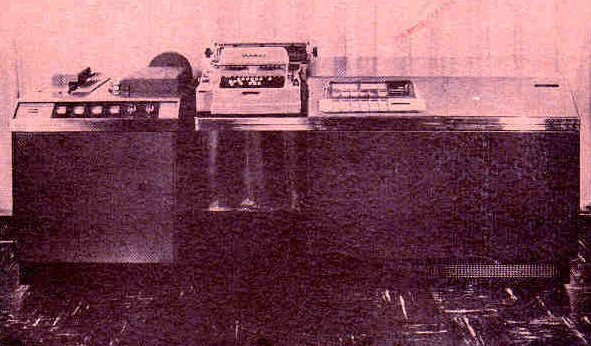
My first personal computer was given to me in 1972 by Hume & Rumble Electrical Contractors. It was a Royal McBee / LibraScope General Precision / Control Data LGP-30. I had programmed it for them in the summer of 1968. It had no RAM, just a rotating magnetic drum, calculating at roughly 60 Hz (Hertz). It contained mainly tubes with a few transistors. Input was via 4 or 6 level paper tape prepared on a Friden FlexOWriter. It had a 32-bit accumulator, but data in storage had to have the low order bit set to 0. It featured hardware integer multiply and divide. Much of my time coding was spent placing operands at auspicious places on the drum so that I could do more than one operation per drum revolution. I created paper prayer wheels as an optimisation tool.
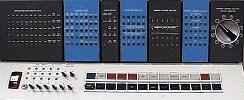
In 1962, IBM (International Business Machines) decided to perform an experiment to see if they could teach children to program computers. I was among the children selected. They taught us to write simple FØRTRAN programs on the IBM 1620 using punch cards. As you might expect children learn faster than adults. Starting that summer, the West Vancouver School Board and the University of BC hired me to write a computer program to work out high school student timetables and schedules. IBM told me I was the youngest computer programmer in the world at that time. Back then it was a bit like being a child astronaut, allowed into the holy inner sanctum computer room. The 1620 at the university had an experimental new storage device called a random access disk. A short time later it was replaced with an IBM 7044. I rubbed shoulders with people like Vern Detwiler (later of MacDonald Detwiler) and Nelson Skalbania who later became a famous tycoon.
 |
This page is posted |
http://mindprod.com/contact/equipment.html |
Optional Replicator mirror
|
J:\mindprod\contact\equipment.html | |
 |
Please read the feedback from other visitors,
or send your own feedback about the site. Contact Roedy. Please feel free to link to this page without explicit permission. | |
| Canadian
Mind
Products
IP:[65.110.21.43] Your face IP:[216.73.217.139] |
| |
| Feedback |
You are visitor number | |