Unfortunately, Oracle has effectively decommitted Applets. This means you can no longer run the various CMP programs in a browser. You must download them and install them.
You must have the most recent Java
JRE (Java Runtime Environment) 1.8.0_131
32-bit or 64-bit. It no longer matters which browser you use.
Oracle has effectively decommited Applets, so this Applet will no longer run online in your browser, but it is a hybrid you
can also download, install and run it on your own machine as standalone
application. It will start and run faster if you do that. It will also
work safely even if you have disabled Java in your browser.
password
A word you use to prove that you are truly you to a computer. You will have a password to log on to your
operating system, one for each affiliate and even one for various free services on the web. Snoops can look at
your files without knowing your login password by booting with an UbuntuLinuxCD (Compact Disc)
and examining your files, bypassing Windows and its passwords. To protect against that, you need to encrypt your
files. Then you have passwords on your files, not just Windows as a whole.
Passwords that are easy to guess include the names of loved ones and
relatives, words in the dictionary, especially ones with strong emotional connotation like God, whale, love.
A tool can crack your password just by trying all words in the dictionary. So you must disguise them. Add
digits, mix the case. This little program will generate you an impossible to guess password. If want to make sure
I am not keeping a copy, download the source, check the
program out and run it on your own machine.
Make sure you paste the generated passwords somewhere for safekeeping. Doing this also helps verify the value you are pasting blind into web forms.
The Australian government recommends changing passwords frequently, at least twice a year, to prevent identity theft and using unguessable passwords at least 8
characters long with a mixture of digits and both upper and lower case letters. The password generator defaults to 10 characters. The Australians celebrate a special day
in early June to change their passwords.
Don’t use the same password at multiple sites unless you don’t care at all about the security of any of them.
A word in the dictionary can be cracked in under a second. That is no security at all.
Java Requirements and Troubleshooting
Password
is a Java Applet (that can also be run as an application)
to Password Generator.
You are welcome to install it on your own website.
If it does not work…
If Copy/Paste (Ctrl-C/Ctrl-V) do not work, you can turn them back on by
modifying your java.policy file. This is not for the novice or faint of heart. instructions
Your alternative is to download this program and run it without a browser.
In the Java Control Panel security tab,
click Start ⇒ Control Panel ⇒
Programs ⇒ Java ⇒ Security, configure medium security
to allow self-signed and vanilla unsigned applets to run.
If medium is not available, or if Java security is blocking you from running the program,
configure high security
and add http://mindprod.com
to the Exception Site List at the bottom of the security tab.
Often problems can be fixed simply by clicking the reload button on your browser.
Make sure you have both JavaScript and Java enabled in your browser.
Make sure the Java in your browser is enabled in the security tab of the Java Control panel.
Click Start ⇒ Control Panel ⇒
Programs ⇒ Java ⇒ Security ⇒
Enable Java Content in the browser.
This Java Applet (that can also be run as an application)
needs 32-bit or 64-bit Java 1.8 or later.
For best results use the latest 1.8.0_131 Java.
It works under any operating system that supports Java
e.g. W2K, XP, W2003, Vista, W2008, W7-32, W7-64, W8-32, W8-64, W2012, W10-32, W10-64, Linux, LinuxARM, LinuxX86, LinuxX64, Ubuntu, Solaris, SolarisSPARC, SolarisSPARC64, SolarisX86, SolarisX64 and OSX
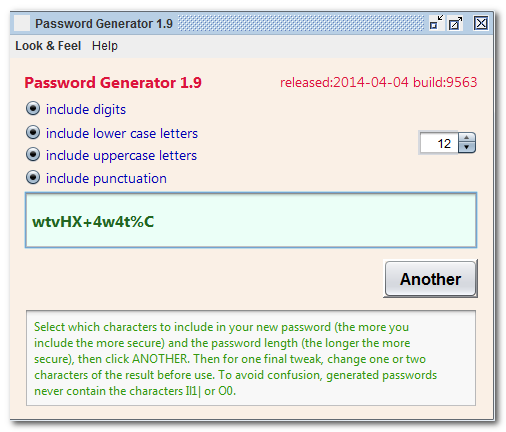
You should see the Applet hybrid above looking much like this
screenshot.
If you don’t, the following hints should help you get it working:
Especially if this Applet hybrid has worked before, try clearing the browser cache and rebooting.
To ensure your Java is up to date, check with Wassup.
First, download it and run it as an application independent of your browser,
then run it online as an Applet to add the complication of your browser.
If the above Applet hybrid does not work,
check the Java console for error messages.
If the above Applet hybrid does not work, you might have better luck with the downloadable version available below.
If you are using Mac OS X and would like an improved Look and Feel,
download the QuaQua look & feel
from randelshofer.ch/quaqua.
UnZip the contained quaqua.jar
and install it in ~/Library/Java/Extensions
or one of the other ext dirs.
Upgrade to the latest version of Internet Explorer or another browser.
Click the Information bar, and then click Allow blocked content. Unfortunately, this also allows dangerous ActiveX code to run. However, you must do this in order to get access to perfectly-safe Java Applets running in a sandbox. This is part of Microsoft’s war on Java.
Try upgrading to a more recent version of your browser,
or try a different browser e.g. Firefox, SeaMonkey, IE or Avant.
If you still can’t get the program working
click the red HELP button below for more detail.
If you can’t get the above Applet hybrid working
after trying the advice above and from the red HELP button below,
have bugs to report or ideas to improve the program or its documentation,
please send me an email at.
If the print is too small to see, use the Opera browser and zoom. Or
copy/paste the generated password blind.
Implementing Passwords
In a highly secure system, each end has a public and private key. They each encrypt and digitally sign a
random message for the other to establish identity. Even these have to be carefully designed to withstand a
man-in-the-middle attack.
There are some lower tech alternatives:
If you have Java on both ends, the server could send a random string of bytes to the client. The client
could concatenate that with a string of bytes representing the password, then run it through a
SHA-1 (Secure Hash Algorithm 1)
or MD5 (Message Digest algorithm 5)
digest and send it back to the server. The server does the same thing and compares its version with the
client’s.
If the server is C++ it won’t necessarily have access to a
SHA-1
or MD5
digest. You could then have to come up with a digest function you can
implement easily in C++. You could use an Adler or CRC (Cyclic Redundancy Check)
with some wrinkle to make it a tad harder to crack, or use one of the HashCode
algorithms.
If you want to avoid a two way exchange for faster login, let the random key be the time of day stamp in
UTC (Coordinated Universal Time/Temps Universel Coordonné). The client sends it along in plaintext with
the digest. The timestamp is rejected if it is too far from now.
For something even lower tech, but unfortunately easy to crack, try XORing the bytes of the password with
something you change periodically.
Base64 alone, cascaded Base64 or ROT13 is no protection at all.
Servers often don’t store bald passwords. They store some sort of
digest of them. That way if someone cracks the password file, they still don’t know the passwords.
Typically raw binary bytes generated by such authentication
schemes are exchanged in base64.
Tomcat has a single signon so that all applications in a realm share the same set of user-IDs and passwords.
If a user logs into one application, he is logged into all. This scheme uses cookies to authenticate each
request.
Tomcat lets you configure the tables and columns to automatically
look up and validate passwords. Caucho Resin similarly lets you
configure SQL (Standard Query Language)
queries to automatically find the passwords in your database.
Graphical Passwords
Another way is to use graphical passwords, easier for the user to
remember and harder to steal. The basic idea is you display a complex image to the user and he selects a number
of click points.
I suspect this scheme is much less secure than it creators claim, since there are a limited number of natural
points of interest in a photo, which could be easily discovered by showing the photo to 100 people.
Passwords at the Client
When your Applet or
JWS (Java Web Start)
applications is pretending to be a browser talking to a server, you can use the java.net.Authenticator to automatically insert the userid and password base64-encoded in your
HTTP (Hypertext Transfer Protocol)
headers in the Authorization field. If the server does not like you userid/password
combination in return a 401 Unauthorized response code. The server gives you no hint as
to whether the userid or the password is the problem. You might consider this obnoxious behaviour, but it is done
that way to make life difficult for people trying to hack the system.
Passwords at the Server
How passwords are handled is specific to each application server.
Most will provide a rudimentary, unsuitable-for-production flat file scheme. The better ones will provide a means
of configuring a database for the users. Almost all allow you to extend a class to provide a custom source.
Java Servlets defines a simple password scheme controlled entirely by a flat file web.xml. This would be suitable for a small company where the list of users and passwords could be
maintained with a text editor by the system administrator.
The best approach (for expandability) is to incorporate a third party SSO (Single Sign-On) (some application
servers come with one). This allows you to add new applications and share the login across them with a minimum of
effort. Also, they typically plug into an existing LDAP (Lightweight Directory Access Protocol)
taking user and password management out of the application’s hands. This allows corporations to take
advantage of existing LDAP
data when deploying applications.
Tomcat offers five different interfaces to databases of passwords. JDBC (Java Data Base Connectivity)
Realm lets you interface to a SQLusers and userroles tables. You configure the name of your
table containing the user IDs and passwords (among other things) and your rôle s table which describes
which rôle s a user can play. You assign Tomcat a userid/password and jDBC connect string to give it with
read-only access to your database to perform the authentications. It is much simpler than it first looks.
Puzzles
Things I have not yet figured out include:
How do you arrange for a timeout, so that after a period of inactivity, the login expires and the user has
to re-enter his password. I know how to do it from first principles, but not with Tomcat.
Just how much does the Applet get in involved with cookies, or do they get piggybacked behind its
back.
Does Java Authenticator understand the Tomcat cookie scheme?
Diceware
This is a scheme for picking a password without using a computer, just some casino dice. The
paranoid instructions are somewhat tongue in cheek. The scheme is just as vulnerable as any other if there is a
keystroke logger (hardware or software) installed on your computer. It is just as vulnerable as other schemes to
others discovering a copy of your password stored somewhere. The big advantage is you don’t have to trust
the author of password-generating software.
Hacking
Here are some ways to crack/guess passwords:
Get a list of common passwords and write a computer program to try them all.
Set up a little website and ask people to give you a password. Chances are they will give you one of their
existing passwords. You can then use it to get into their other accounts.
Snoop on the conversation between user and website, pluck the password out of the initial message.
Try out all the words in the dictionary.
Try all possible combinations of 4 letters, punctuation and digits.
Look for passwords written in a book or slip of paper in the computer desk.
If you know the person, try the names of their friends and relatives, pets, favourite celebrities.
Look for a master list of passwords in a text file on disk.
I hope this shows you why making up passwords is not a good practice. You need something truly random like
passwords from the password generator.
Rant on Multiple Passwords
There is a special ring in hell for companies that issue multiple account numbers and passwords to each client
and make them guess which one the computer wants. If some people have access to a forum, just add a permission
bit to their account record. Don’t issue them a separate account number.
Rant on Keying Passwords Blind
In HTML (Hypertext Markup Language), you can force people to type blind into forms.
Instead of what you type, you just see ***. This feature is commonly used to hide the password as you login to
some website.
<!-- making the user type a password blind in html5 --><form action="/login" method="get"><input name="user[password]" size="50" type="password"></form>
Disadvantages of Typing Blind
Many people cannot touch type if they cannot see what they are doing. It totally throws them off.
Passwords are gibberish. They are a nightmare type at the best of times. How can you be expected to get
them right if you can’t see what you are doing?
If you are setting a password and you get it wrong, you will never be able to type it correctly in
future.
Some sites even go so far as to block you from pasting a password. This is just plain sadistic.
Most of the time a password protects the right to post on a forum under a given id, that’s all. It is
not the CIA (Central Intelligence Agency)
or Credit Suisse. There is no money involved. There is no need for high security.
The ordeal encourages people to pick easy-to-type, easy-to-remember, easy-to-guess, terrible passwords and
to reuse them at every site.
If you are pasting things like your name, address, phone, password…, you can easily blindly paste
the wrong thing and not notice.
Ideally you would use a program such as Password Safe or Dashlane to keep track of your keywords. You key
in a master pass phrase and it virtually types the proper keyword for you without ever making it visible.
Having to type the password phrase blind will push most users into abandoning such a program and use a simple
text file they copy and paste from which has much much less security.
Advantages of Typing Blind
The concern is security. Someone might be looking over your shoulder. However, many people, like myself,
work alone. There is no need for this.
Someone might be monitoring the radio emanations of your screen. That was a problem with CRTs (Cathode Ray Tubes), but flat
screen monitors don’t emit intelligible screen images.
Somebody might have installed a hardware or software spying keystroke logger. Typing blind does nothing to
defeat them.
Some sites make you type blind, but let you see what you are typing at any time by clicking a button. I think
that is a reasonable compromise.
Another related problem is making you type a Captcha when you register. It takes about 40 trials to get the Captcha right. Each time they erase the passwords you have selected. The
security benefits are almost nil. The frustration and ill will is huge.
Weak Passwords
Sometimes sites require a password just to read material or make comments. You could care less if anyone
cracked your password. It is a nuisance to create a strong password and have to look it up every time you logon
to the site. In that case you can use a weak password.
It is short and easy to remember, easy to type, but still not easily guessable.
It does not have to be random.
You use that same password for all your sites that pointlessly require a password, e.g. newspapers.
You never use it for an important site like a bank, PayPal, income tax filing…
Don’t use a weak password if your enemies might try to embarrass you by posting odd things in your
name.
Alternatives
Passwords are primitive. They are little better than no security at all. There are better systems, called
private/public certificates that have been around for decades that don’t require you to reveal your
password to anyone, not even yourself, so they do not require websites maintaining good security. They
don’t require you to memorize or type anything.
What are the alternatives?
There is another school of thought that you should keep passwords to 4 to 6 letters and force users to
accept frequently changed ones. This discourages users from writing them down and discourages them for reusing
them elsewhere.
We could invent a portable hardware password wallet that generates random passwords and coughs up the
corresponding password for any given URL (Uniform Resource Locator). This would defeat a keystroke logger. It
could be implemented with software similar to PWSafe (augmented with browser plug-ins) on a
AES (Advanced Encryption Standard)
encrypted USB (Universal Serial Bus)
Flash Drive. There would be no keystrokes and nothing on the screen to spy on. Of course, they could still spy
on your Internet connection, internally before it is TLS-encrypted. High security is expensive and
inconvenient.
Indonesia has a electronic national
ID card that uses contactless smart cards, with fingerprint verification. Such a system could be adapted to
provide ID on the Internet.
You could also use a certificate-based system like the USA military CAC (Common Access Card)
card. There are no passwords to remember or record. There are no passwords to steal or snoop on. There is no
record of your passwords on the servers you contact or even digests of them. Nothing you send over the wire if
intercepted would help you log in yourself or login to some other site. Nothing stored on the website is of any
use to hackers. It is highly secure. One certificate could be you key to everything on the Internet, to your
house lock, car locks etc. It could control where you are allowed to wander at work, in hospitals, in public
buildings etc. You could securely buy stuff over the Internet. Right now Internet purchases are secure as
Fedexing each merchant a box full of blank cheques. (Once he has your credit card number, he can buy anything
he wants anywhere.) The certificate based system would be your forge-proof passport and universal ID.
The country of Estonia has been using a
public/private key id-card system since 2002.
Digits.com
Digits.com claim they will soon have a system based on your
phone number. I am skeptical. Any such system that was secure would not even need a phone number. If it is based
on your phone number, any who knows your phone number can apply the algorithm, and learn your password. Besides
you need way more than just one password.
The 25 Most Common Passwords
If you have been using one of these passwords, or ones similar, you might as well not have a password at
all. If you use any word in the dictionary, a patient computer hacker makes that password
almost as ridiculous.
123456
password
12345678
qwerty
abc123
123456789
111111
1234567
iloveyou
adobe123
123123
Admin
1234567890
letmein
photoshop
1234
monkey
shadow
sunshine
12345
password1
princess
azerty
trustno1
000000
Lost Passwords
Many websites insist you tell them your email id and your userId before they will send you your lost password or let you choose a new one.
If you have lost your password 90% of the time you have also lost your userId. All you should need is your email.
Your main defence against this is to use the exact same userId everywhere. You cannot do this perfectly because sites will often reject your first choice.
I normally use the id RoedyGreen because it is unlikely someone else has already chosen it. It is sufficiently long. People seeing it can google Roedy Green to
find my other works
and my website even on sites that ban URLs (Uniform Resource Locators). It also assures people it is a real name.
When you make a mistake in your userId or password, sites will not tell if the problem is you no longer have an account, typed the userId incorrectly or
typed the password incorrectly. There is good reason for this. If they gave you hints, they would also be giving hackers hints to crack your password.
Password Storage
There are programs that will securely store all your passwords. They are protected by one master password and
encryption. Such programs include:
Adobe installs True Key without your permission, and it resists the ordinary attempts at uninstallation. This
is not the behaviour you expect from Adobe.
In case the product/service is discontinued, there should be some way to export the passwords in
human-readable form.
Chrome, Firefox and Opera will remember your passwords, and automatically send them when needed. This is very convenient and secure. You don’t have to select
the password, key, or copy-paste it. The catch is browsers periodically forget their list of passwords without warning.
Password Solution
Sites that ask you to provide passwords should either:
Concoct suitable passwords and assign them to you.
Check the password candidates from users to make sure they are not common and do not exist in the
dictionary.
Form a consortium to issue digital certificates, or the provide the specifications for certificate
companies to issue them so that passwords become obsolete. You just visit sites without any need to logon. Your
certificate is checked in the background. Unlike SSL (Secure Sockets Layer) certs, there needs to
be a standard set of roots automatically installed in all software. Estonia has already done this. Your
certificate allows you to sign legal documents online, purchase prescriptions. It is your general id.
Websites should not permit passwords that appear in the dictionary. They should either assign random passwords
or use digital certificates. If you let people use weak passwords, they will.
Please read the feedback from other visitors,
or send your own feedback about the site. Contact Roedy.
Please feel free to link to this page without explicit permission.
Canadian
Mind
Products
IP:[65.110.21.43]
Your face IP:[18.119.104.238]


 password
 .
. Get New Java
Get New Browser
Get New Java
Get New Browser