


A JList renders like this:
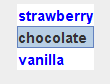
Unlike JComboBox, JList does not notify the DataModel of selection changes.
You will get two ListSelectionEvents, one when the mouse button goes down and one when it releases. This is not considered a bug.
The removeAll method does not remove all the possible list selections. It is a vestigial method inherited from Container. Instead you must use DefaultListModel. clear.
What if the field you want to display is not the field the toString method displays from your data objects? You will need to create your own ListCellRender classe to select the field you want to display.
 |
This page is posted |
http://mindprod.com/jgloss/jlist.html |
Optional Replicator mirror
|
J:\mindprod\jgloss\jlist.html | |
 |
Please read the feedback from other visitors,
or send your own feedback about the site. Contact Roedy. Please feel free to link to this page without explicit permission. | |
| Canadian
Mind
Products
IP:[65.110.21.43] Your face IP:[13.59.82.167] |
| |
| Feedback |
You are visitor number | |