


Here is what is looks like:
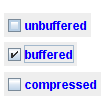
Each box is one JCheckBox.
JCheckBox uses a checkmark; JRadioButton uses a dot in a circle and JToggleButton uses ordinary-looking buttons.
Here is how to use a
When you convert from an AWT CheckBox, you must change the getState calls to isSelected calls.
 |
This page is posted |
http://mindprod.com/jgloss/jcheckbox.html |
Optional Replicator mirror
|
J:\mindprod\jgloss\jcheckbox.html | |
 |
Please read the feedback from other visitors,
or send your own feedback about the site. Contact Roedy. Please feel free to link to this page without explicit permission. | |
| Canadian
Mind
Products
IP:[65.110.21.43] Your face IP:[3.140.198.43] |
| |
| Feedback |
You are visitor number | |