screen cleaning : Computer Hardware Buyers’ Glossary

cleaning  screen cleaning
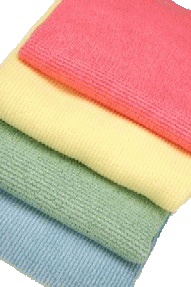
microfibre cloths
microfibre cloths
You have to periodically clean CRT (Cathode Ray Tube) or LCD (Liquid Crystal Display) screens to get rid of fingerprints and dust. The Mac glossy screens are both the most delicate and the ones that get dirtiest fastest. Here is a safe way to clean them.
  1. Turn off the computer.
  2. Use a microfibre cloth or chamois, not a scratchy paper towel.
  3. Get the bulk of the dust off with a clean microfibre cloth.
  4. Mist a microfibre cloth with a sprayer of plain water. Don’t spray the screen directly.
  5. Wipe away the dirt, dust and fingerprints with small circular motions.
  6. Finish by wiping with a dry microfibre cloth.
  7. If that does not work, use a screen cleaner product, one designed for screens or eyeglasses, e.g. PixelClean, ShaggyMac Opti-Mist Prime or Klear Screen. Ordinary glass cleaners may be too harsh for some LCD screens. They should be fine for the older glass CRT screens.

CMP homejump to top You can get the freshest copy of this page from: or possibly from your local J: drive (Java virtual drive/mindprod.com website mirror)
http://mindprod.com/bgloss/screencleaning.html J:\mindprod\bgloss\screencleaning.html
logofeedback Please email your feedback for publication, letters to the editor, errors, omissions, typos, formatting errors, ambiguities, unclear wording, broken/redirected link reports, suggestions to improve this page or comments to Roedy Green : feedback email If you want your message kept confidential, not considered for posting, please explicitly specify that.
mindprod.com IP:[65.110.21.43]
viewYour face IP:[38.107.179.213]
You are visitor number 11.