


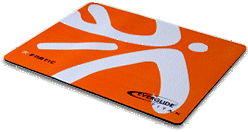
 mouse pad
With optical mice, you want as slippery a mouse-pad surface as possible to give you fine control of mouse motion. You also want something with an intricate, variegated, micro pattern (not a solid colour) to give the optics something to notice moving. Game players particularly go in for fancy mouse pads to get every last drop of control. Modern mice are not as picky about the surface pattern.
| Why Black Mouse Pads? | Cleaning |
| Purchasing | Mice |
| Miscellaneous Notes | Mouse Feet |
| My Ideal Mouse Pad | Links |
I was puzzled why nearly all high performance mouse pads are solid black. You’d think you would want a black and white micro grid or millions of tiny coloured dots to create a tracking pattern. I think I solved the mystery by peeking under my mouse at the way light reflects off my new black mousepad. The surface feels smooth, but it is actually pebbly, with millions of very tiny bumps and grooves. The red LED (Light-Emitting Diode) light reflecting off it forms a fine network of thin spidery bright red lines. The lines form where the angle of the surface is just right to reflect light back. This is just what the sensor needs, an intricate, high contrast pattern to track. The black helps enhance the contrast. On the other hand, my Logitech M310 mouse definitely prefers a light surface, even a plain white surface. On a darker surface the cursor moves very slowly. It does not seem to notice it is moving. Silk-covered (not silk-screened) cloth pads are very slippery and don’t wear the mouse feet off so quickly. Ideally you want to try out a pad with your own mouse before you buy.
There are several kinds of optical mice:
Which kind of mousepad is best for for each kind of mouse I do not know, however, I suspect expensive black mousepads are intended for expensive red laser mice. Infrared mice must have a light-coloured mouse pad. They will barely work with a black one. I have ordered light 3M mouse pads with micro-patterning for our Logitech M310 and M325 mice. but they have not arrived yet.
| Premium Low Friction Mouse Pads | ||||||
|---|---|---|---|---|---|---|
| Manufacturer | Model | Size in inches |
Metric in mm |
Cost |
Price Includes Shipping? |
Notes |
| Deviant Art | Digitally Printed | 7.75 x 9 | 19.05 x 22.86 | Digitally printed with your choice of artwork from their galleries. This is an ordinary mousepad, not a high performance surface. The dimensions and price depends on the artwork you select. | ||
 |
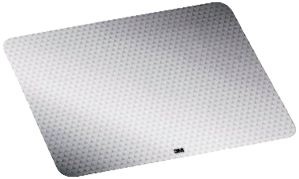
3M Precise Mousing Surface | 8.71 x 9.21 | 221 x 233 | Granddaddy of the high tech mouse pads. Uses a microgrooved surface. Light coloured. Claims to extend battery life by 75%. Presumably mice are smart enough to turn down the power of the beam if they are having no problem tracking moving micro patterns. This is what I use myself. It works very well. It is a little on the small side. It is no thicker than a piece of stiff paper. The adhesive backing works perfectly, but I guess 3M has had some practice at that. | ||
 |
steelseries QcK mini | 9.8 x 8.3 x 0.23 | 250 x 210 x 3 | Cloth surface. Danish company that makes over a dozen different models. | ||
 |
Kabuto | 11.03 x 7.68 x 0.39 | 28 x 19.5 x .10 | black. Micro-fibre. | ||
 |
Zoom | 8.5 x 11 | 216 x 279 | Thinner than a credit card. Has a hexagonal honeycomb pattern. Only ship to the USA. | ||
 |
GearHead MPD3000BLU | 9.45 x 10.63 x 0.16 | 24 x 27 x 0.4 | Sky blue. | ||
|
Vespula | 11.8 x 9.45 x 0.16 | 30 x 24 x 0.4 | black. Two sided. Gel rest. Designed for gaming. | ||
|
Manticore | 10.04 x 13.98 x 0.09 | 25.5 x 35.5 x 0.22 | |||
|
Ripper XL | 14 x 17.5 x 0.125 | 356 x 451 3.2 | Can be rolled up. This is the mat the Xtracs Pad-o-matic computer program recommended I buy. However, I was looking for something more colourful. They only ship to the USA. | ||
|
Ripper XXL | 36 x 18 | 914 x 457 | Sleeps eight, ridiculously huge. For comparison, my anti static mat is only 60.96 × 58.42 cm (2 × 1.92 ft) and my entire desk surface is 1.47 × 0.74 metres (4.83 × 2.42 ft). It would cover 40% of my desk surface. I think they intend you also rest your keyboard on it. Cloth surface. Only ship to the USA. | ||
I have discovered your choice of mousepad or mousing surface makes a huge difference in how smoothly your cursor moves. With a bad surface, the mouse does not notice it is moving and the cursor lurches. Further, if the surface has too much friction you cannot finely control the mouse. It sticks and releases in tiny jerks. So in theory the ideal mousepad would have the following characteristics:
Unfortunately, you can’t take mousepads for test drive before purchase. Before you buy, Google the model and see what people who bought it thought. Also I have not even seen a mousepad for sale that lays claims to these ideals. The mousepad I received as a gift disappeared. I do a fair bit of single pixel work drawing and editing where I have to insert the text cursor between two small characters. Both require excellent mouse control. That requires the best possible mouse pad.
You can make a powerful yet environmentally friendly glass cleaner similar to Windex. Here is a recipe for a three 650 mls (1.37 US pints) sprayers full:
| water | 1.65 litres (1.74 US quarts) |
| isopropyl alcohol 70% or 99% | 240 mls (1.01 US cups) |
| sudsy ammonia | 60 mls (2.03 fl oz) |
| Dawn dishwashing liquid | 2½ mls (0.51 US teaspoon) |
| blue food colouring. | 1 drop (1 drop) |
The blue food colouring is optional; it helps identify the sprayer contents as window cleaner. Use a microfibre cloth.
 |
recommend electronic⇒3M Precise Optical Mousing Surface | |||||||||||||||||||||||||||||||||||||||||||||
| asin | B0017D5Z40 | |||||||||||||||||||||||||||||||||||||||||||||
|---|---|---|---|---|---|---|---|---|---|---|---|---|---|---|---|---|---|---|---|---|---|---|---|---|---|---|---|---|---|---|---|---|---|---|---|---|---|---|---|---|---|---|---|---|---|---|
| dim | 17.78 × 21.59 × 0.15 cm 7 × 8½ × 0.06 in | |||||||||||||||||||||||||||||||||||||||||||||
| Granddaddy of the high tech mouse pads. Light coloured. Micro textured to improve the accuracy of mice. It gives them a micropattern to detect motion. Claims to extend the battery life 75%. Presumably mice are smart enough to turn down the power of the beam if they are having no problem tracking moving micro patterns. It is quite small and thin. They have a vinyl smell and pebbly surface. The mouse make a zipper-like noise as it moves over the pebbly surface. At first the sound was distracting, but then I got used to it. Within 24 hours it had worn off the feet off my mouse, though it still moved easily. It has a tacky backing to hold it in place. The cursor moves very quickly, which suggests the surface is indeed optimal for detecting motion. The cursor moves all the way across the screen when when I move the mouse less then half way across the tiny pad, so the pad does not need to be as big as usual. It has no built-in wrist rest. This is what I use myself. | ||||||||||||||||||||||||||||||||||||||||||||||
| ||||||||||||||||||||||||||||||||||||||||||||||
| Greyed out stores probably do not have the item in stock | ||||||||||||||||||||||||||||||||||||||||||||||
 |
This page is posted |
http://mindprod.com/bgloss/mousepad.html |
Optional Replicator mirror
|
J:\mindprod\bgloss\mousepad.html | |
 |
Please read the feedback from other visitors,
or send your own feedback about the site. Contact Roedy. Please feel free to link to this page without explicit permission. | |
| Canadian
Mind
Products
IP:[65.110.21.43] Your face IP:[216.73.217.43] |
| |
| Feedback |
You are visitor number | |


