


If you select the all fonts option, it will display the true heights of a 10 point font. Excusing themselves with artistic licence, font designers make their type sometimes up to twice as tall as requested or as small as half as tall. It makes some sense for fonts that also render Chinese to increase the size to ensure any Chinese rendered will still be legible. You might use these numbers to adjust the font sizes selected in css or Java to fully or partially compensate.
If the font of interest supported all the characters, the display would look like this: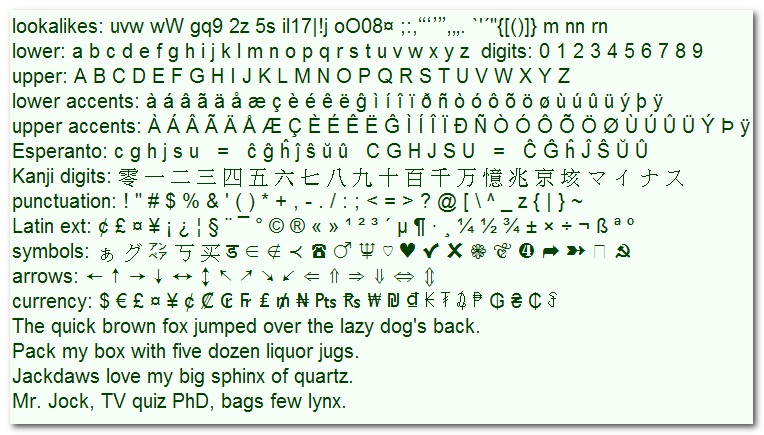
 .
. Get New Java
Get New Browser
Get New Java
Get New Browser

Your browser will see a slightly different set of fonts than this Java Applet does. Java has a few extra private fonts and some browser fonts don’t work with Java.
Some of the fonts may just show empty squares. These are older 8-bit fonts that don’t support 16-bit Unicode used by Java. Don’t necessarily delete them ( by clicking Control Panel ⇒ fonts ⇒ delete) since word processing documents, or the DOS (Disk Operating System) box, may still be using them. on the other hand, pruning out ugly fonts you never use will speed up your machine.
You may not notice any difference with font-smoothing anti-aliasing. Anti-aliasing does not work on some machines. Look for the anti-alias smoothing especially in very large font sizes in capital W in the fonts with thin spidery diagonals, e.g. Bodoni, Book Antiqua, Garamond, Serif and Zapf Calligraphic.
Hint: If you put the cursor on the font family dialog box, you can scroll up and down using up or down arrow key to display all possible font samples very rapidly.
To compare two fonts side by side, download the FontShower jar and run two copies of it standalone. To see how all possible Unicode glyphs render in all supported fonts, see the Unicode Applet.
| Fonts that show unusually large numbers of glyphs | |
|---|---|
| Font | Number of Glyphs |
| Arial Unicode MS | 50377 |
| Bitstream Cyberbit | 29934 |
| LastResort | 6207 |
| Everson Mono Unicode | 4899 |
FontShower will only show Fonts supported under Java.
| Font Support Under Java | ||||||
|---|---|---|---|---|---|---|
| Font Type | Extension | Java version 1.6Windows | Java version 1.6Linux | Java version 1.6Fedora | Old Java Windows | Notes |
| OpenType (TrueType internally) |
otf | High-end fonts for Windows. | ||||
| OpenType (PostScript Adobe CCF (Composite Container Format) internally) |
otf | High end PostScript fonts. You can detect these by the file signature { 0x4F, 0x54, 0x54, 0x4F } — the string "OTTO", at the head of the file. | ||||
| TrueType | ttf | Most common font for Windows. | ||||
| PostScript | pfm/pfb | Older style PS fonts. Supported by PostScript printer hardware. Windows itself supports PS fonts, at least with Adobe Type Manager, but Java ignores them. | ||||
| Bitmap | fon | Used primarily for small font sizes. Come only a small set of point sizes. | ||||
| Vector outline | fon | These are obsolete. Used by Windows without Java. | ||||
| 8-bit fonts | any | Java needs 16-bit fonts. It won’t use 8-bit fonts directly. Old or specialty 8-bit fonts can be used by stitching them together with a Unicode mapping, a daunting task. | ||||
| SVG (Scalable Vector Graphics)fonts | svg | Vector fonts used in Linux. They tend to be free. Java does not out-the-box support them. Opera 10 beta supports them and allows them to be downloaded with a web page so you can use fonts the viewer does not necessarily already have installed. | ||||
AWT (Advanced Windowing Toolkit) will only support the five basic logical fonts, unless you paint on a Canvas, however, oddly under Fedora and AWT you can use up to 82 of your installed fonts. If you try to use more, you get an ArrayIndexOutOfBoundsException. The above information may be incorrect or may become incorrect at any time. Feel free to try any fonts with Java on any platform. The worst that could happen is they won’t work.
| Package | Version | Released | Licence | Language | Notes | ||
|---|---|---|---|---|---|---|---|
FontShower |
2.9 | 2009-09-30 | free | Java |  ❘ precis
❘ screenshot
❘ browse source repository
❘ precis
❘ screenshot
❘ browse source repository
for the current version of FontShower. Displays Swing fonts available to Java on your machine in various styles, sizes and colours. Displays true font heights.  698K
zip for FontShower Java source, compiled class files, jar and documentation to run on your own machine either as an application or an Applet.
698K
zip for FontShower Java source, compiled class files, jar and documentation to run on your own machine either as an application or an Applet.
Runs on any OS that supports Java e.g. W2K, XP, W2003, Vista, W2008, W7-32, W7-64, W8-32, W8-64, W2012, W10-32, W10-64, Linux, LinuxARM, LinuxX86, LinuxX64, Ubuntu, Solaris, SolarisSPARC, SolarisSPARC64, SolarisX86, SolarisX64 and OSX. First install the most recent Java. To install, extract the zip download with WinZip, (or similar unzip utility) into any directory you please, often J:\ — ticking off the use folder names option. To check out the corresponding source from the Subversion repository, use the TortoiseSVN repo-browser to After you have installed the jar, you can run it as an application. Type: java -jar J:\com\mindprod\fontshower\fontshower.jar
adjusting as necessary to account for where the jar file is. download ASP PAD XML program description for the current version of FontShower. FontShower is free. Full source included. You may even include the source code, modified or unmodified in free/commercial open source/proprietary programs that you write and distribute. Non-military use only. |
||
 |
This page is posted |
http://mindprod.com/applet/fontshower.html |
Optional Replicator mirror
|
J:\mindprod\applet\fontshower.html | |
 |
Please read the feedback from other visitors,
or send your own feedback about the site. Contact Roedy. Please feel free to link to this page without explicit permission. | |
| Canadian
Mind
Products
IP:[65.110.21.43] Your face IP:[216.73.217.43] |
| |
| Feedback |
You are visitor number | |
