The CurrCon Java Applet displays prices on this
web page converted with today’s exchange rates into your local international currency,
e.g. Euros, US dollars, Canadian dollars, British Pounds, Indian Rupees…
CurrCon requires an up-to-date browser
and Java version 1.8, preferably 1.8.0_131.
If you can’t see the prices in your local currency,
Troubleshoot. Use Firefox for best results.
Webring.com is an organisation that helps organise webrings, like-minded websites
that link to each other in circle. on managing and joining them. Though it is
actually very simple, about 50% of people who apply to join
rings fail, if they don’t get experienced help. With the rise search engines,
the importance of web rings has declined.
This document will lead you step by step
through what to do to get your website on a webring. It sounds complicated, but you
go step by step, you will succeed. Webring.com is an organisation that helps organise
webrings, like-minded websites that link to each other in circle. WebRings bring more
people to your site. WebRings are composed of websites, not email ids. Now there are
two levels of membership: Level 1 memberships are free. Level 2 memberships are
per year. With Level 2, Webring will set up the nav bars on your website for you and
other perks. You are not required to place any ads on your site. To become part of
the ring, you embed a piece of JavaScript HTML on your webpage called a navbar (or sometimes a SSNB —
SSNB (Server Side Navigation Bar). A nav bar renders something like this:
People can visit each website in the ring in turn by clicking on the nav bar
next button.
The
There is an alternate version of the nav bar HTML that uses no Javascript at all
that lets you customise the way the nav bar looks.
If you don’t have a website, you can get a free one from an ISPISP (Internet Service Provider)
such as SimpleNet,
Angelfire or GeoCities. You can’t join a ring until you have a working website with
something on it to show people. In a pinch, you might borrow a corner of
somebody else’s website.
You will need to learn HTML4 or some HTML
generating tool. You will need some simple (often free) tools to write and validate your HTML. You will need an FTP tool to upload your creation from your local hard
disk to the webserver. I use Netload which
completely automates the process and FTP
Voyager to recover when things go off the rails. The coming instructions look
intimidating. Admittedly they are long-winded, but they are not that difficult if you
go step by step. It might help to print out these instructions and tick them off as
you complete each step.
Terminology
hub logo
A large, up to *.gif, *.jpg
or *.png image that is used on the hub page. It is not the
same as the nav bar logo. You need both. As a ringmaster, you can change it with
Edit Ring Logo. It can take perhaps half an hour to show
up on the websites after you upload a new logo.
nav bar
navigation bar. A piece of HTML that
generates a box representing the web ring on your web page. Visitors can click to
go the next site in the ring or go to the ring hub to join themselves. The nav bar
handles all your webrings for that webpage. You don’t need one per webring.
It works because all the different webrings use the same U# embedded in the nav
bar. I like to put them near the bottom of the page so that if something goes
wrong, you can still view the top part of the page.
nav bar logo
sometimes called the ring logo. A 50 × 50*.gif, *.jpg (but not a *.png) icon
that is used on the on the nav bar page. It is not the same as the hub logo. You
need both. As a ringmaster, you can change it with Customization ⇒ Navigation code ⇒ Nav bar logo. It can
take perhaps half an hour to show up on the websites after you upload a new
logo.
ring home page
A web page created by the ringmaster giving any information he wants. On my web
home pages I give extra explanation on setting up the nav bar.
SSNB
SSNB. A
more technical term for the navbar, especially when talking about the magic numbers
it contains to identify the ring and site and webpage.
ring hub
A web page at webring.com for a ring that lists the member
sites. It also gives you a place to join the ring.
ringmaster
The person in charge of a webring. They get to decide who can join and who
can’t. They set up the criteria and adjudicate them. They also do the
administrative work for the ring.
site
Webring uses the word site is two different ways which is very confusing. If
you are a ringmaster the sites are the website that have signed up for your ring.
If you are looking at a U# for an URL, then the sites are the rings this site
belongs to.
site URL
An HTTP (Hypertext Transfer Protocol) URL that
points to the website, webpage and anchor on the page where you want visitors to
arrive. That is also where you place the nav bar so that visitors can leave for
the next site in the ring. URLs are long, so WebRing assigns each unique URL that
you use an abbreviation, called the U#, normally a number but it can contain
letters.
community
The new term for WebRing, sometimes called a WebRing
community, all the websites on one ring.
Joining New Rings
This section applies to everyone
joining a ring.
Click on Join Now on the nav bar of some site
already in the ring and follow your nose. This will take you to WebRing.com, the
company that manages the rings. Alternatively, click here to go to
Webring.com.
If you don’t already have a webring.com login id, you can choose an id
and password. You will use this id for all your rings, not just for the one ring
you are joining. click here to sign up
Click join ring on somebody’s nav bar who is
already in the ring, or else find some ring in the huge hierarchy of
possibilities.
You will be asked to describe your site and give its
URL (Uniform Resource Locator). Make sure you give the URL
of the page where you plan the put the nav bar, not your home
page (unless, of course, you plan to put the nav bar on your home page). This is
the landing place where arriving visitors start their tour of your site. It is
also the taking off place for them to depart to the next site on the ring. Giving
the wrong URL is the most common error.
Filling in that form will generate an automatic email to me telling me, the
ringmaster, that you want to join the ring. I have to ok your application.
Click My Rings at the top of the page.
Click View websites on the left.
Click Get SSNB
code next to the corresponding webring.
It will show you a piece of gobbledegook html something like this. The actual
nav bar is not indented or commented like the one I showed at the top of the page.
This is the nav bar you have been hearing so much about. A single nav bar handles
all the rings that use the same URL.
Cut and paste it into your web page. Make sure you get the whole thing including
the final </script>. Don’t copy
my nav bars. They won’t work for you. You need to get versions
customised for you.
HTMLValidator will complain that
the nav bar is not valid HTML (Hypertext Markup Language), so you
might be tempted to correct it, adding the missing type and quotes. However, if
you do that, unfortunately the automated-nav-bar-finder will fail and you will
find yourself automatically suspended from the ring. You must use the nav
bar exactly as given. use the <cseignore> </cseignore> to tell it to
ignore the errors.
The most important thing to understand is that the nav
bar must be displayed on the page where you want the web ring to
send visitors when they first land on your site, on the preciseURL you told
Webring.com. The automated Webring.com link-checking software is not smart
enough to go searching for it. This rigid scheme has the added benefit of making it
easy for users to find the link to the next website after they have explored your
site.
This section is only for advanced users using frames. You have five choices.
Klutzy
: Point Webring directly to the frame containing your rings,
and provide a link on that page back to your home page which then redisplays
the surrounding frames. The page will first appear without its normal
enclosing frame.
Ruthless
: Put your nav bar on a non-frame page.
Theoretically Correct
: Create a new frameset page very much like
your index.html page. The difference is it brings
up your rings page inside the frame instead of the usual default index page.
You point Webring.com to that enclosing frameset page. Unfortunately, Webring
cannot always find the nav bar if it is embedded in a frame. At times it
seems to, then loses the ability.
Advanced
: use multiple copies of the nav bar. There will be one
landing place and many taking off places. I will explain this in greater
detail later. Use one of the other techniques for your landing place. No
matter what else you do, you must always have a valid nav bar for that
URL on the landing page.
Optimisitic
: Just put the nav bar in a frame and hope for the best.
It might work.
I repeat. It won’t work to point the
URL to your
home page and then hide the nav bar on some other page. The automatic link checker
can’t find the nav bar and it will automatically suspend you. You
must put the nav bar on the exact URL
of the page that you tell Webring.com when you join the ring.
Upload the page to your website. Remember to re-upload every time you change
the HTML or
your site content.
Usually your nav bar will start working within seconds after the ringmaster
approves your site. Until then, nothing will happen, so not to panic. Eventually,
the nav bar will eventually show up.
If you don’t get your nav bar successfully installed, the automatic nav
bar checker will suspend you. This is so that people using the ring won’t get
stuck when they come to your site. It means nothing at all about the quality of
your site. It is no reason to panic. Further, if for any reason your nav bar stops
working at some point in future, Webring.com will automatically suspend you until
you get the problem fixed.
Making Changes
If later you want to change some of the information about your site, such as
its name, description or URL, go to Webring.com and click
View Ring Sites.
Then click the line representing your web page. The most likely thing you would
want to change is your URL
if you decide to move the nav bar to a new page. Make sure you get a new
nav bar when you change the URL. It is confusing because the old nav bar may appear to work, at least
for a while.
Under the Hood
If you are a novice,
just ignore this section. You might wonder why Webrings don’t just have a
standard nav bar link to the Webring site, not needing any customisation at all, no
account and no u#. The problem is WebRing would have no way of knowing where the
reference came from, which website and which page on that site the nav bar was
located. Many browsers hide that information. Presumably, WebRing could have put the
website referring url in as a parameter, but instead they chose to encode the same
information with an account and a u#. Which a click on the nav bar comes in, WebRing,
looks up that account and that u# to find the website and referring page and the
list of Webrings attached that u#/page. This gives them a little more control.
It also lets you play games by assigning multiple different u#s to the same page,
and hence allowing multiple independent nav bars on the same page.
Clever readers will have noticed that this scheme also allows you to put your nav
bars on several different websites, all managed by the same account.
Bugs
It may not be a bug, but a feature. Here are some
of the bugs/shortcomings I have detected in the Webring.com ring management software.
If you notice that any of these have been fixed, please let me know.
These are bugs I discovered at the time Yahoo.com was running the webring. I have
not yet retested to see if these bugs have been fixed. Be wary of them.
Webring.com Bugs
Bug
Fixed?
Description
pending display
Some pending websites are missing from the Your Ring Memberships list.
restricted join
When you join a ring, you cannot join another until the pending status of
the first one is resolved. This can take weeks. You have to buy a level 2
membership to avoid this log jam. This is strictly speaking not a bug, just a
very annoying feature.
tests not propagated
When you test a web page to ensure it has a good nav bar, you it marks only
one of the rings as passed. It should mark all rings that use that page as
passed.
failed link lock
If you have a failed link because of a missing or erroneous nav bar, you
can’t join any other rings until you fix the problem. However, even after
you fix the problem, you still can’t join. You have to wait until the
next day until some batch process updates your good guy status.
orphaned links
If the webring you are joined to goes defunct, your website will display a
random ring rather than a defunct marker.
*.png not supported
If you upload a png for the nav logo or link to one, nothing happens, no
error message.
reload collapses stack
If you click reload to view a page, the stack which was showing all
webrings collapses to show only one.
wrong ring
Webring often displays nav bars totally unrelated to the U# on the
page.
Wrong ringmaster email id
There is no way to change the ringmaster’s email id.
ringmaster change
There is no way to have a new ringmaster take over.
Nav bar finder can’t find the nav bar if HTML
errors in it are corrected.
Can’t find old gif-style ring logo
Nav bar finder can’t see the old graphics style nav bars previously
used when webrings.org managed the rings. It thinks the link is broken.
frames confuse nav bar
Nav bar finder can’t see a nav bar in a frame. It thinks the link is
broken.
bad sort
Your personal list of rings are not sorted in alphabetical or any other
meaningful order. In contrast, ringmaster can order the sites in the ring any
way they choose.
url not displayed
The list of all rings you are joined to does not display the
URLs (Uniform Resource Locators)
of your web pages.
ringmaster hamstrung
Ringmasters can’t correct spelling and grammatical errors in site
descriptions. They can’t correct URLs.
They can’t get nav bars for people to insert in
HTML
and send back for upload.
wrong ordering
Ringmasters are asked to approve websites before the nav bars are
installed. Sites without nav bars should never be activated.
invalid email ids
Webring.com approves rings sites where there is no way to contact the site
manager by email.
ring home page
Webmaster cannot explicitly designate the ring’s home page.
restart
When ringmasters manage sites, the lists start over at the beginning each
time, rather than picking up where you left off.
mysterious nav bar codes
Nav bars use a special code that ties them to a particular page. You
can’t verify they are correct, other than by installing new nav bars. I
think it might be possible to have standard nav bars that can be safely
duplicated moved about, even between sites. Not a single member of one of my
rings was able to successfully install a nav bar!
dead rings
Most rings are dead. These is no way before you go to the effort of joining
to see when the ringmaster last did any ring management.
nav bar test
There is no way to trigger a bulk retest of multiple broken nav bars. There
is no way to know how fresh the test results are.
nav bar box too small
Box where you pick up the nav bar is too small to let you view it all at
once or copy/paste it without scrolling.
nav bar icon preview
After you change the nav bar icon, webring does not show it to you to make
sure you picked an appropriate image. You can’t proof it on your website
either, since the change does not become visible till somewhat later. Your
mistakes should not be viewed by the public. Webring rejected my bug report on
this saying it properly should be submitted as a wish list request and asked
that I start over from scratch in my submission.
png support
You can use png for the ring hub image but not for the nav bar icon.
Ring image does not display.
Even when you have a ring image, it does not display in the editing
screens.
ugly image
There need to be two images, one tiny one 32 ×
32 for the nav bar and one big one 150 ×
150 to decorate the ring hub. They used to use only one mid-size image
and send it for both purposes. So it looked ugly decorating the ring hub and
wasted bandwith for the nav bar icon.
The more people who report a given bug, the more likely Webring.com is to
take the bug report seriously and to give that bug priority.
Trouble Shooting
Webring carefully hides the button to get it to
verify/ test your latest nav bar
upload. click my account ⇒ manage memberships ⇒ Go
HERE if you want to see/manage/edit the sites that you have in other
rings. (aka My websites in URL
Order)⇒ click on the site title (middle colum), not
on the pass/fail ⇒ click on test (just after The
status of your navigation code is: Fail, half way down the page in the fine print.)
Oddly, you can’t access the test from the Go HERE
to manage your website URL, U#, get navigation code, view your
SSNB
stack(s), etc. (aka My websites in URL
Order) screen.
If your nav bar test fails, double check the following:
Is the nav bar on the exact same URL
you told Webring.com? If not, either tell Webring.com (on the appropriate form) the
correct place or move the nav bar to the correct page.
Get a fresh nav bar. Nav bars only work properly on the page they were created
for.
Don’t change the nav bar HTML
in any way. Don’t even put a carriage return in the middle of it. Once you
get it working you can try tidying up the HTML
checking all the time that the tests for nav bar presence still works and all its
buttons still work.
Scan your website to make sure the u#s are unique and that they match the
Webring.com records.
If you rename a webpage containing a nav bar, you must tell WebRing the new
URL it is
associated with. You can keep the same U#, just tell WebRing point it to the new
URL. If you
get confused, just install a new nav bar with a different u#.
On the Go HERE to manage your website
URL, U#, get
navigation code, view your SSNB
stack(s), etc. (aka My websites in URL
Order) screen you will sometimes see Delete
SSNB
code beside an entry. This means there are no living webrings associated with
that web page any more. You should either delete the nav bar from your page and the
entry from WebRing, or join some suitable rings. These defunct pages will not show up
at all in the click my account ⇒ manage memberships ⇒
Go HERE if you want to see/manage/edit the sites that you have in other
rings (aka Your Ring Memberships) page.
Alternatives
See RingSurf, a competing WebRing scheme. If you hope to hide from
nav bars by going to RingSurf you are out of luck. They are in the process of
converting to nav bars too. RingSurf and Webring.com nav bars are handled completely
independently. If you have both RingSurf and Webring.com rings on the same page, you
need both a RingSurf and a Webring.com nav bar.
Once you get the hang of it, joining
WebRings is easy. You don’t have to keep adding more nav bars past the first
one. You can browse the list of
existing rings. and join the ones you like, or just chase the links visiting
sites exploring the creativity of your fellow humans.
To make all the webrings show up in the nav bar, configure the size of the stack
on the WebRing site. Otherwise visitors to your site have to click Visit a complete list of WebRing memberships here in fine
print, to see the other rings. The effect can take 30 minutes or so to show up.
Starting Your own WebRing
If you don’t see a suitable
WebRing to join, you can create your own WebRing. All you need
is a logo gif in both 50 × 50 for the nav bars and
150 × 150 (up to 250x250) for the hub. pixels, best
with a transparent background, that you could prepare with PaintShop Pro. Browse the Webring.com categories to find where it would fit,
then click create a ring and follow your nose. At first
you will tend to get lost in the menus. Be patient with yourself and you will find
you can soon manage several rings with very little effort. The real work talking
people into joining your ring. It is hard at the beginning and gets easier as the
ring grows and becomes ever more attractive.
It works best if you provide a URL
instead uploading your logos. Your server will be faster than theirs. Also they seem
to compress and distort the images, so the URL
method gives nicer looking images.
Webring automatically tests member sites periodically to make sure they are
properly installed. They can fail or pass or pass-L. Pass-L
means he put the nav bar on a different page from where incoming visitors land, but
that they can get to the nav bar to leave in one link. Typically visitors land on the
home page and click webrings to get to the nav bars. It is a judgement call whether
you should allow these. I do not. They make it harder for visitors to navigate to the
next link.
If you have trouble with one of the rings I manage, you can email me at
or phone me,
Roedy Green, at (250) 361-9093. That is in Victoria, BC Canada. However, there are
many things I cannot do for you.
I can’t put your nav ring in for you (unless you trust me with your
ISP
id/password and FTP (File Transfer Protocol) trivia) to upload the finished result.
Unless you give me your Webring.com id/password, I can’t change your
URL.
Unless you give me your Webring.com id/password, I can’t change your site
name.
Unless you give me your Webring.com id/password, I can’t change your site
description.
You normally have to do all those things for yourself.
Please read the feedback from other visitors,
or send your own feedback about the site. Contact Roedy.
Please feel free to link to this page without explicit permission.
Canadian
Mind
Products
IP:[65.110.21.43]
Your face IP:[216.73.216.149]


 WebRing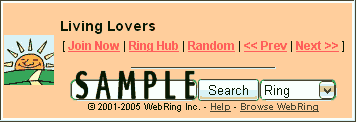
 community
 or phone me,
Roedy Green, at (250) 361-9093. That is in Victoria, BC Canada. However, there are
many things I cannot do for you.
or phone me,
Roedy Green, at (250) 361-9093. That is in Victoria, BC Canada. However, there are
many things I cannot do for you.

