Unfortunately, Oracle has effectively decommitted Applets. This means you can no longer run the various CMP programs in a browser. You must download them and install them.
You must have the most recent Java
JRE (Java Runtime Environment) 1.8.0_131
32-bit or 64-bit. It no longer matters which browser you use.
Oracle has effectively decommited Applets, so this Applet will no longer run online in your browser, but it is a hybrid you
can also download, install and run it on your own machine as standalone
application. It will start and run faster if you do that. It will also
work safely even if you have disabled Java in your browser.
A TimeZone is a Java class for a region of the earth that
keeps the same time.
Spelling
Spelling is chaotic. The Java class is spelled precisely
TimeZone. When you see that spelling on this website, you
know I am referring to the Java class. Authorities say that time
zone, timezone and time-zone are all correct. You will more frequently see timezone in the USA and time-zone in Britain,
however, I have discovered from study Google hits, that most people including the
Americans and Brits use time zone. I attempt to use the
time zone spelling consistently on this web site.
What are Time Zones
If the people in a given time zone keep different time in
summer and winter, everyone is the region flips together. The TimeZone class describes the offset from UTC (Coordinated Universal Time/Temps Universel Coordonné)
in summer and winter time and when the flips occur of a given time zone. To get the
default TimeZone adjusted for the user’s location:
In ordinary use, a time zone is a region of the earth
that keeps the same winter time. They may or may not all flip to summer time at the
same time and some parts may not flip at all.
TimeZone Names and Offsets
The names for time
zones used in Java comes from a database
maintained by Arthur David Olson. For
reasons only he understands, Pacific Standard Time is
called America/Los_Angeles.
The reason that local time is different at different spots on the earth is a
consequence of:
The earth rotates on its axis.
The earth rotates counter-clockwise when viewed looking down on the north
pole.
The earth rotates west to east.
The sun rises in the east and sets in the
west.
In natural time, noon is when the sun is highest in the sky. This happens at
one instant each day and at a different instant each day for each degree of
latitude.
People back east get up earlier and go to bed
earlier.
The reason we have time zones is to make synchronising railway
(and later airline and TV) schedules easier. If we used natural time, based on
observing the instant the sun were highest in the sky, every town would have its own
slightly different clock from its immediate neighbours. This is how things used to be
done in the days of the stagecoach.
You will see many different ways of specifying a time zone, including:
Olson: America/Vancouver
Posix: PST8PDT
UTC relative UTC-8
UTC-7
Here is a list of available TimeZones:
Java Requirements and Troubleshooting
TZ
is a Java Applet (that can also be run as an application)
to TimeZone.
You are welcome to install it on your own website.
If it does not work…
If Copy/Paste (Ctrl-C/Ctrl-V) do not work, you can turn them back on by
modifying your java.policy file. This is not for the novice or faint of heart. instructions
Your alternative is to download this program and run it without a browser.
In the Java Control Panel security tab,
click Start ⇒ Control Panel ⇒
Programs ⇒ Java ⇒ Security, configure medium security
to allow self-signed and vanilla unsigned applets to run.
If medium is not available, or if Java security is blocking you from running the program,
configure high security
and add http://mindprod.com
to the Exception Site List at the bottom of the security tab.
Often problems can be fixed simply by clicking the reload button on your browser.
Make sure you have both JavaScript and Java enabled in your browser.
Make sure the Java in your browser is enabled in the security tab of the Java Control panel.
Click Start ⇒ Control Panel ⇒
Programs ⇒ Java ⇒ Security ⇒
Enable Java Content in the browser.
This Java Applet (that can also be run as an application)
needs 32-bit or 64-bit Java 1.8 or later.
For best results use the latest 1.8.0_131 Java.
It works under any operating system that supports Java
e.g. W2K, XP, W2003, Vista, W2008, W7-32, W7-64, W8-32, W8-64, W2012, W10-32, W10-64, Linux, LinuxARM, LinuxX86, LinuxX64, Ubuntu, Solaris, SolarisSPARC, SolarisSPARC64, SolarisX86, SolarisX64 and OSX
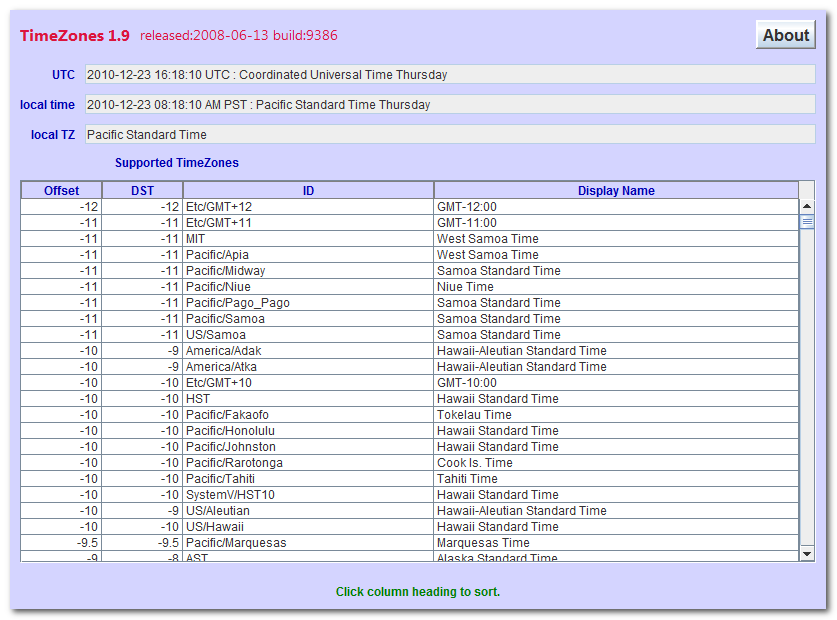
You should see the Applet hybrid above looking much like this
screenshot.
If you don’t, the following hints should help you get it working:
Especially if this Applet hybrid has worked before, try clearing the browser cache and rebooting.
To ensure your Java is up to date, check with Wassup.
First, download it and run it as an application independent of your browser,
then run it online as an Applet to add the complication of your browser.
If the above Applet hybrid does not work,
check the Java console for error messages.
If the above Applet hybrid does not work, you might have better luck with the downloadable version available below.
If you are using Mac OS X and would like an improved Look and Feel,
download the QuaQua look & feel
from randelshofer.ch/quaqua.
UnZip the contained quaqua.jar
and install it in ~/Library/Java/Extensions
or one of the other ext dirs.
Upgrade to the latest version of Internet Explorer or another browser.
Click the Information bar, and then click Allow blocked content. Unfortunately, this also allows dangerous ActiveX code to run. However, you must do this in order to get access to perfectly-safe Java Applets running in a sandbox. This is part of Microsoft’s war on Java.
Try upgrading to a more recent version of your browser,
or try a different browser e.g. Firefox, SeaMonkey, IE or Avant.
If you still can’t get the program working
click the red HELP button below for more detail.
If you can’t get the above Applet hybrid working
after trying the advice above and from the red HELP button below,
have bugs to report or ideas to improve the program or its documentation,
please send me an email at.
Add column 1 in hours to UTC
to get local standard time.
Add column 2 in hours to UTC to get local daylight saving time.
Use UTC
when you want no time zone at all.
Use Asia/Riyadh for Arabia Standard Time. Asia/Riyadh87, Asia/Riyadh88
and Asia/Riyadh89 are 3 hours and 7 minutes east of UTC. This is the offset used in 1987 to 1989. Actually it was 3 hours 7 minutes and 4 seconds to approximate solar time. Prior to 1950 they used 3:06:52. In the period 1951— 1986 and 1990 onward they used a simple 3 hour difference. In Islamic tradition, the day starts at sunset.
Note how much many aliases there are for the same time zone. I speculate there are two reasons for this:
To anticipate some geographical region adopting a quirky daylight saving rule in future. There would be no need adjust to a new split time zone to adopt the new rule. Only the tables
built into Java would need to be adjusted.
It makes it easier for people to find their own time zone. They need find only a nearby city without having to consult a map to find a distant city on the same longitude. Often they can
find their own city directly.
Gotchas
Timezone names never contain spaces. They use underscores, e. g.
America/Los_Angeles. In Linux, make sure /etc/sysconfig/clock use official underscore names.
Use UTC rather that GMT (Greenwich Mean Time) for the base time used internally.
GMT is London
civil time and has a DST (Daylight Saving Time) correction in summer.
UTC huh not CUT? It was a weird compromise acronym
half way between French and English. GMT
stands for GMT.
You can find out the current time at any place on the globe at WorldTimeServer.com. It will tell you the
offset from UTC, but not the time zone name. huh not CUT? It was a
weird compromise acronym half way between French and English.
Unfortunately, you can’t extract the rules about when daylight savings go
into effect from a TimeZone object. I suppose if you were
patient you could deduce them by binary search on inDaylightTime. You could also study the code that is used to
construct all the TimeZone objects in rt.jar, or the various locale jars and decompile and parse that to
extract the information.
Here are the rules for the switch days in the EU. There are
some algorithms to compute them.
Switch days are decided politically so can change erratically, especially in the
USA, albeit with advance notice. In ancient Rome, one could bribe officials to have
months lengthened or shortened, so we have made progress.
Olson Timezone Database
An ordinary citizen, David
Olson has maintained a database of timezone and DST
trivia that was used by the entire computing community. It was a much bigger job than
you might imagine. Have a look at some of the changes in 2011.
He has retired his server because a mean-spirited astrology company, Astrolabe, sued him distributing data free
they sell. This information is clearly in the public domain. It is no secret when
DST stops and
starts and how far off UTC each spot on earth was at various times in the past.
He did not have the resources to fight back. So for now, there is no one keeping
track! Perhaps Anonymous could punish Astrolabe for this evil deed. Perhaps Oracle
could sue them for selling their timezone data.
These turkeys attempted to screw Microsoft, Oracle,
AT&T (American Telephone & Telegraph), the airlines, the
railroads and every operating system/computer program that deals with local time.
They all rely directly or indirectly on the Olson tables. All went well and Astrolabe
was handily defeated.
Please read the feedback from other visitors,
or send your own feedback about the site. Contact Roedy.
Please feel free to link to this page without explicit permission.
Canadian
Mind
Products
IP:[65.110.21.43]
Your face IP:[216.73.216.139]


 .
. Get New Java
Get New Browser
Get New Java
Get New Browser