


| IP addresses | The Miracle of DNS |
| Explicit DNS Lookup | Caching |
| Discovering your Host Name | Clearing DNS Cache |
| Discovering your DNS Server | Suffix |
| How DNS Works | Links |
For a LAN, you can assign IP addresses such as 192.168.0.1, 192.168.0.2 to each station since these are never seen on the Internet. In Windows, you can use the utility ipconfig /all to display information such as DNS Server IP, host name, physical ethernet 48-bit MAC (Media Access Control) address, IP, subnet mask, gateway IP and DHCP server IP. In older versions of Windows there is a similar utility called winipconfig.
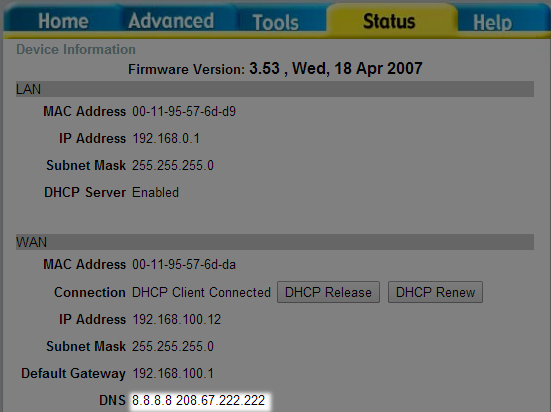
When, in turn I ask my D-Link router which DNS servers it is using, it gives me a display like this:
There is a master database of all DNS names and their corresponding IP names. It is not stored all in one computer, but to simplify the explanation, we will pretend that it is. Some DNS names have associated several IP of server farms that are assigned on a round robin basis to share the workload.
www.mindprod.com, mail.mindprod.com and mindprod.com may all translate to different IP or to the same IP. All three are tracked in the master database. Ordinary humans aren’t allowed to talk to this master database. Instead you talk to a DNS server run by your local ISP (Internet Service Provider). It does not have the entire database in it, just the entries most popular with the clients of your ISP. If you ask your ISP DNS server for a name it does not know, it asks a higher level server. If that higher level server does not know, it asks still a higher level server, working all the way back to the master DNS database server.
Does this mean you pester the master database every time you ask for a non-existent DNS name? Yes, but since the master database is actually entirely replicated in many computers, this is not the bottleneck you might expect.
How are changes propagated? Roughly once a day each DNS server asks the next higher level server if each of the entries it has cached in its local database is still valid. If not, it drops each invalid entry from its local database. If somebody later asks for that DNS name, the server will asks the next higher level server.
The master database server, through a tree of helpers, periodically asks every station on the net if its DNS name to IP translations are still valid and if not, what the new information is. The information percolates up so that the master database is then completely up-to-date. From the master database, the information gradually percolates back down to all the ISP servers, through the ordinary process of asking the next higher level server when a server does not have a name in its cache. Information does not percolate down until it is needed. It generally takes about two days for out-of-date information to be totally flushed out of the system. How long it takes depends on a configurable freshness date for each name.
This way your computer only has to tell the Internet once about a DNS change. It does not have to directly tell every DNS server on the Internet.
What goes wrong is sometimes servers refuse to delete invalid cached entries. Then the only way to clear the out-of-date information is to reboot them and clear the entire cache. NT DNS servers have this problem. When a server fails to invalidate its cache, all downstream servers will be badly (i.e. weeks) out-of-date as well. The problem is not cleared until that server is rebooted.
DNS can do a number of other things besides convert a domain name to an IP number. It can go the other way, starting with an IP, figure out the DNS name. It can find out the latitutude and longitude of the server hosting the domain. It can find out what kind of CPU (Central Processing Unit) the server is. It can find out who owns the domain. It can distribute digital certificates. It can tell you the name of the associated mail servers. In Java you access this additional information with JNDI.
 |
recommend book⇒DNS and BIND, fifth edition | |||||||||||||||||||||||||||||||||||||||||||||||||||||||
| by | Cricket Liu, Paul Albitz | 978-0-596-10057-5 | paperback | |||||||||||||||||||||||||||||||||||||||||||||||||||||
|---|---|---|---|---|---|---|---|---|---|---|---|---|---|---|---|---|---|---|---|---|---|---|---|---|---|---|---|---|---|---|---|---|---|---|---|---|---|---|---|---|---|---|---|---|---|---|---|---|---|---|---|---|---|---|---|---|
| publisher | O’Reilly  |
978-0-596-55340-1 | eBook | |||||||||||||||||||||||||||||||||||||||||||||||||||||
| published | 2006-06-02 | B0026OR2QS | kindle | |||||||||||||||||||||||||||||||||||||||||||||||||||||
| Covers up to version 9.1.0 BIND. Also cover IPv6. This explains how Domain Name Service finds the corresponding IP to a name. BIND in the software that usually comes bundled with Unix for letting you manange your little branch of the DNS name tree. | ||||||||||||||||||||||||||||||||||||||||||||||||||||||||
| ||||||||||||||||||||||||||||||||||||||||||||||||||||||||
| Greyed out stores probably do not have the item in stock. Try looking for it with a bookfinder. | ||||||||||||||||||||||||||||||||||||||||||||||||||||||||
The IP routing system can also be controlled by simple flat files. Each router looks at the IP of the incoming packet and determines which band (low/high) it belongs in and has a table which node to send all packets in that band to, hopefully a step closer to their destinations. Some bands may have several destinations to share the load. Clever routers can start forwarding a packet even before it has fully arrived.
The DNS lookup services of the native OS (Operating System) can be very slow. So Java caches the results. You can control how long a DNS to IP lookup remains fresh in the cache with two entries in the java.security files.
Look for the networkaddress.cache.ttl TTL (Time To Live) networkaddress.cache.negative.ttl. Documentation on using them is embedded in the comments in the java.security file.
You can also set the security properties programmatically with:
// setting cache time to live to 10 seconds
java.security.Security.setProperty( "networkaddress.cache.ttl" , "10" );
To clear the DNS cache:
If you use DHCP, your router or IAP (Internet Access Provider) will provide the IP of the DNS servers automatically, so you don’t have to configure them. Typing ipconfig at the command prompt will display the names of the DNS servers. If you suspect one of your DNS servers is not working properly, you can use ipconfig /renew to ask your IAP to resend the list.
You can use short names such us shawmail or shawnews instead of spelling out the name in full shawmail.glb.shawcable.net or shawnews.gv.shawcable.net if you set up a connection-specific prefix to use as a default suffix to append to short names. You can do it like this: Control Panel ⇒ network and sharing center ⇒ manage network connections ⇒ right click the connection ⇒ properties ⇒ TCP/IP4 ⇒ advanced ⇒ DNS ⇒ append these DNS suffixes
Your DNS servers may have the wrong IP or may not have the domain you want on file. If your ISP is not providing reliable DNS servers, or you suspect there is a problem with them you can try out some alternates. Of course, these alternates may fail too, so don’t forget how to put them back the way they were. Since your ISPs servers are physically close, they should provide the fastest service. To configure DNS servers, Click Control Panel ⇒ Network & Internet ⇒ Network Connections ⇒ right click Properties.
 |
This page is posted |
http://mindprod.com/jgloss/dns.html |
Optional Replicator mirror
|
J:\mindprod\jgloss\dns.html | |
 |
Please read the feedback from other visitors,
or send your own feedback about the site. Contact Roedy. Please feel free to link to this page without explicit permission. | |
| Canadian
Mind
Products
IP:[65.110.21.43] Your face IP:[18.191.135.224] |
| |
| Feedback |
You are visitor number | |


