Unfortunately, Oracle has effectively decommitted Applets. This means you can no longer run the various CMP programs in a browser. You must download them and install them.
You must have the most recent Java
JRE (Java Runtime Environment) 1.8.0_131
32-bit or 64-bit. It no longer matters which browser you use.
Oracle has effectively decommited Applets, so this Applet will no longer run online in your browser, but it is a hybrid you
can also download, install and run it on your own machine as standalone
application. It will start and run faster if you do that. It will also
work safely even if you have disabled Java in your browser.
This calculator will tell you how much it costs to do various tasks with
electricity
depending on where you live. It will tell you in your own local currency,
no matter where
you live on the planet. All you have to do is select your location (or a
location with
similar power costs to where you live) and select the activity. This
information will
help you figure out where you can most easily save money and save the
planet in the
bargain.
How are the Calculations Done?
PowCost has an internal list of locations and the cost per Kwh. After you
select a
location and an activity, it multiplies together the cost of electricity
per Kwh at that
location, the time in hours of the activity and an adjustment based on
today currency
exchange rates to convert into your local currency.
The raw information comes from many sources all over the Internet. If you
have better
costs, please send them to me, any currency is ok, cost per Kwh. Please
feel free costs
any locations I have not mentioned, or to make requests for still more
activities.
Tips
If you have not already done so, switch from a
CRT (Cathode Ray Tube)
monitor to an
LCD (Liquid Crystal Display).
Use you laptop, tablet or cell-phone in preference to your desktop
computer.
Use headphones instead of loudspeakers.
If you fill your kettle with twice as much water as you plan to use,
you will use twice as much electricity to boil it.
You should turn off lights when you leave the room, even fluorescents.
When you first
start a fluorescent you use about one minute’s worth of power, not
an entire
night’s worth as urban legend would have you believe.
Carbon Footprint
Though the use of electricity does not generate any greenhouse gases, the
process of
generating it does, especially burning natural gas, oil or worst of all,
coal. Different
countries make their power in a different mix of ways.
Carbon dioxide emitted in electricity generation
CO₂
emitted in electricity
generation
Country
grams of
CO₂
emitted per kilowatt hour
of electricity generated.
Lower is better.
As you can see, the electric car takes 25
times as much
energy as an electric kettle. If the electric car were to replace the
gasoline car, the
electric grid could not sustain the immense extra load to recharge them. A
much bigger
change is required, namely using much smaller, lighter vehicles, perhaps
more along the
lines of the Segway, the electric bicycle or a small single-passenger pod,
computer-driven at densities impossible for human drivers.
Java Requirements and Troubleshooting
PowCost
is a signed Java Applet (that can also be run as an application)
to Power Cost Calculator.
You are welcome to install it on your own website.
If it does not work…
For this Applet hybrid to work, you must click grant/accept/always run on this site/I accept the risk
to give it permission to allow you to configure the look & feel.
If you refuse to grant permission, the program may crash with an inscrutable stack dump
on the console complaining about AccessController.checkPermission.
In the Java Control Panel security tab,
click Start ⇒ Control Panel ⇒
Programs ⇒ Java ⇒ Security, configure medium security
to allow self-signed and vanilla unsigned applets to run.
If medium is not available, or if Java security is blocking you from running the program,
configure high security
and add http://mindprod.com
to the Exception Site List at the bottom of the security tab.
Often problems can be fixed simply by clicking the reload button on your browser.
Make sure you have both JavaScript and Java enabled in your browser.
Make sure the Java in your browser is enabled in the security tab of the Java Control panel.
Click Start ⇒ Control Panel ⇒
Programs ⇒ Java ⇒ Security ⇒
Enable Java Content in the browser.
This signed Java Applet (that can also be run as an application)
needs 32-bit or 64-bit Java 1.8 or later.
For best results use the latest 1.8.0_131 Java.
It works under any operating system that supports Java
e.g. W2K, XP, W2003, Vista, W2008, W7-32, W7-64, W8-32, W8-64, W2012, W10-32, W10-64, Linux, LinuxARM, LinuxX86, LinuxX64, Ubuntu, Solaris, SolarisSPARC, SolarisSPARC64, SolarisX86, SolarisX64 and OSX
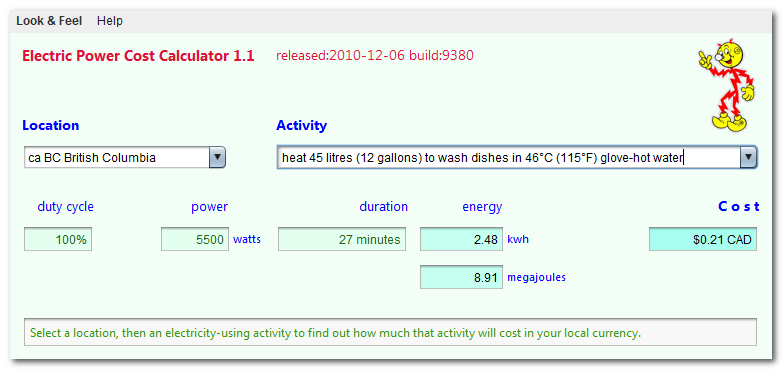
You should see the Applet hybrid above looking much like this
screenshot.
If you don’t, the following hints should help you get it working:
If the above Applet hybrid appears to freeze-up, click
Alt-Esc repeatedly to check for any buried permission dialog box.
If you have certificate troubles,
check the installed certificates
and remove or update any obsolete or suspected defective certificates.
The only certificate used by this program is mindprodcert2017rsa.cer.
Especially if this Applet hybrid has worked before, try clearing the browser cache and rebooting.
To ensure your Java is up to date, check with Wassup.
First, download it and run it as an application independent of your browser,
then run it online as an Applet to add the complication of your browser.
If the above Applet hybrid does not work,
check the Java console for error messages.
If the above Applet hybrid does not work, you might have better luck with the downloadable version available below.
If you are using Mac OS X and would like an improved Look and Feel,
download the QuaQua look & feel
from randelshofer.ch/quaqua.
UnZip the contained quaqua.jar
and install it in ~/Library/Java/Extensions
or one of the other ext dirs.
Upgrade to the latest version of Internet Explorer or another browser.
Click the Information bar, and then click Allow blocked content. Unfortunately, this also allows dangerous ActiveX code to run. However, you must do this in order to get access to perfectly-safe Java Applets running in a sandbox. This is part of Microsoft’s war on Java.
Try upgrading to a more recent version of your browser,
or try a different browser e.g. Firefox, SeaMonkey, IE or Avant.
If you still can’t get the program working
click the red HELP button below for more detail.
If you can’t get the above Applet hybrid working
after trying the advice above and from the red HELP button below,
have bugs to report or ideas to improve the program or its documentation,
please send me an email at.
To install, extract the zip download with WinZip,
(or similar unzip utility) into any directory you please,
often J:\ — ticking off the
use folder names option.
To check out the corresponding source from the Subversion repository, use the TortoiseSVN repo-browser to access powcost source in repository with [Tortoise] Subversion client on wush.net/svn/mindprod/com/mindprod/powcost/.
After you have installed the jar, you can run it as an application. Type:
java -jar J:\com\mindprod\powcost\powcost.jar
adjusting as necessary to account for where the jar file is.
PowCost is free. Full source included.
You may even include the source code, modified or unmodified
in free/commercial open source/proprietary programs that you write and distribute. Non-military use only.
$22.79
electronic link to P3 P4400 Kill A Watt Electricity Usage Monitor
recommend electronic⇒P3 P4400 Kill A Watt Electricity Usage Monitor
asin
B00009MDBU
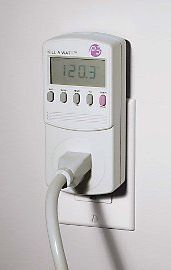
Measure power usage in watts of an appliance up to 1800 watts. Plug it into an outlet and plug your appliance into the unit. Comes with an LCD screen. There are three fancier models the P4600, P4480 and P4330. manual.
Please read the feedback from other visitors,
or send your own feedback about the site. Contact Roedy.
Please feel free to link to this page without explicit permission.
Canadian
Mind
Products
IP:[65.110.21.43]
Your face IP:[216.73.217.43]


 .
. Get New Java
Get New Browser
Get New Java
Get New Browser

 ❘ precis
❘ screenshot
❘ browse source repository
❘ precis
❘ screenshot
❘ browse source repository
 3.6MB
zip for PowCost Java source, compiled class files, jar and documentation to run on your own machine either as an application or an Applet.
3.6MB
zip for PowCost Java source, compiled class files, jar and documentation to run on your own machine either as an application or an Applet.