In Words  In Words

This view this page, you should have a recent Java installed, preferably 32-bit JRE (Java Runtime Environment) 1.7.0_02.
This Applet spells out numbers in words in a variety of languages. You might use the code for writing cheques. It will help you learn to count in Bahasa Indonesia, Binary, Decimal, Dutch (modern, old and banker’s), English (British, North American and ordinals), Esperanto, French, German, Hexadecimal, Icelandic, Italian, Martian, Metric Prefixes (grams), Norwegian, Octal, Polish, RAM (Random Access Memory) (bytes), Roman Numerals, Spanish, Swedish or Tagalog. It is mainly just a test harness for the InWords class that will convert numbers to their long form in words.

To see the Polish accents, or the Japanese Kanji, you will need browser that supports Unicode characters above Latin-1. The Esperanto naû really should have a breve (smile) accent above the u, but most browsers cannot display it so I used the circumflex instead.

Even if you don’t speak Japanese, try it out. The Japanese have an extremely logical notation for numbers.

Please report any errors via email. If you are willing to provide the rules (or sufficient examples) for your favourite language, I will add that too.

The program is also available with Java source to download and run it either as an Applet or an application.

Sorry, you need Java 1.5 or later to run this Applet.

If, InWords, the above In Words signed Java Applet (that can also be run as an application) does not work…

  1. Often problems can be fixed simply by clicking the reload button on your browser.
  2. Make sure you have both JavaScript and Java enabled in your browser.
  3. This signed Java Applet (that can also be run as an application) needs 32-bit (not 64-bit) Java 1.5 or later. For best results use the latest 1.7.0_02. If you have both 32 and 64-bit JVMs installed, in the Java Control Panel, configure your 32-bit java.exe as the user JVM and your 64-bit java.exe as the system JVM. You also need a recent browser.
  4. It works under any operating system that supports Java e.g. W2K/XP/W2003/Vista/W7-32/W7-64/Linux/OSX
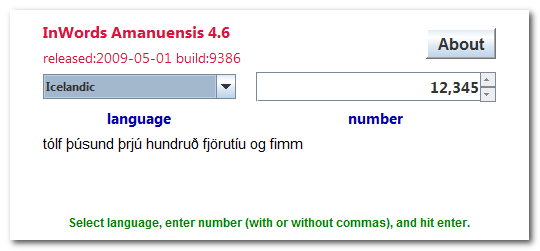
  5. You should see the Applet hybrid above looking much like this screenshot. If you don’t, the following hints should help you get it working:
  6. For this Applet hybrid to work, you must click grant/accept to give it permission to let you copy/paste. If you refuse to grant permission, the program may crash with an inscrutable stack dump on the console complaining about AccessController.checkPermission.
  7. Optionally, you may permanently install the Canadian Mind Products code-signing certificate so you don’t have to grant each time.
  8. If the above Applet hybrid appears to freeze-up, click Alt-Esc repeatedly to check for any buried permission dialog box.
  9. If you have certificate troubles, check the installed certificates and remove or update any obsolete or suspected defective certificates. The only certificate used by this program is mindprodcert2012dsa.cer.
  10. Especially if this Applet hybrid has worked before, try clearing the browser cache and rebooting.
  11. To ensure your Java is up to date, check with Wassup. First, download it and run it as an application independent of your browser, then run it online as an Applet to add the complication of your browser.
  12. If the above Applet hybrid does not work, check the Java console for error messages.
  13. If the above Applet hybrid does not work, you might have better luck with the downloadable version available below.
  14. If you are using Mac OS X and would like an improved Look and Feel, download the QuaQua look & feel from randelshofer.ch/quaqua. UnZip the contained quaqua.jar and install it in ~/Library/Java/Extensions or one of the other ext dirs.
  15. If you are using Microsoft Internet Explorer 7, 8 or 9, try another browser. Seriously. Microsoft has taken great pains, over and over, to screw up Java and every other multi-platform standardisation.
  16. If you are using Microsoft Internet Explorer 7, 8 or 9, you must click to allow blocked content permission for Active X to run. This also gives permission to Java to run. Click the Information bar, and then click Allow blocked content. Unfortunately, this also allows dangerous ActiveX code to run. However, you must do this in order to get access to perfectly-safe Java Applets running in a sandbox. This is part of Microsoft’s war on Java. Don’t put up with it! Use a different browser.
  17. If you are using Microsoft Internet Explorer 9, makes sure the Java Plug-In SSV helper add-in is installed and enabled. If it is not, try reinstalling the Java JRE.
  18. If you have Windows 7 64-bit and Internet Explorer 64-bit, in theory you can use 64-bit Java, but I never been able to get it to work.
  19. Try upgrading to a more recent version of your browser, or try a different browser e.g. Firefox, SeaMoney, Safari or Avant.
  20. If you still can’t get the program working click HELP for more detail.
  21. If you can’t get the above Applet hybrid working after trying the advice above and from the HELP button below, have bugs to report or ideas to improve the program or its documentation, please send me an email atemail Roedy Green.
Java powered   Get New Java  Get New Browser   Help
PackageVersionReleasedLicenceLanguageNotes 
inwords
In Words
4.6 2009-05-01 free Java
more infoprecisscreenshotbrowse source repository
for the current version of In Words.
Classes to spell out numbers in words. Works in Bahasa Indonesia, Binary, Decimal, Dutch (modern, old and banker’s), English (British, North American and ordinals), Esperanto, French, German, Hexadecimal, Icelandic, Italian, Martian, Metric Prefixes (grams), Norwegian, Octal, Polish, RAM (bytes), Roman Numerals, Spanish, Swedish or Tagalog. Classes could be used in a multi-lingual cheque-writing program.

download 1,248K zip for In Words Java source, compiled class files, jar and documentation to run on your own machine either as an application or an Applet.

First install the most recent Java.

To install, extract the zip download with WinZip, (or similar unzip utility) into any directory you please, often J:\ — ticking off the use folder names option.

To check out the corresponding source from the Subversion repository, use the TortoiseSVN repo-browser to
access inwords source in repository with [Tortoise] Subversion client on wush.net/svn/mindprod/com/mindprod/inwords/.

After you have installed the jar, you can run it as an application. Type:

java -jar J:\com\mindprod\inwords\inwords.jar

adjusting as necessary to account for where the jar file is.

download ASP PAD XML program description for the current version of In Words.

In Words is free.
$489.00 US donated so far. If the CMP utilities solved your problem, please donate a buck or two, or donate to one of the charities featured in the footer public service ads throughout the website and get a tax receipt.
Full source included. You may even include the source code, modified or unmodified in free/commercial open source/proprietary programs that you write and distribute. Non-military use only.


CMP homejump to top You can get the freshest copy of this page from: or possibly from your local J: drive (Java virtual drive/mindprod.com website mirror)
http://mindprod.com/applet/inwords.html J:\mindprod\applet\inwords.html
logofeedback Please email your feedback for publication, letters to the editor, errors, omissions, typos, formatting errors, ambiguities, unclear wording, broken/redirected link reports, suggestions to improve this page or comments to Roedy Green : feedback email If you want your message kept confidential, not considered for posting, please explicitly specify that.
mindprod.com IP:[65.110.21.43]
view BlogYour face IP:[38.107.179.210]
You are visitor number 43,985.