Unfortunately, Oracle has effectively decommitted Applets. This means you can no longer run the various CMP programs in a browser. You must download them and install them.
You must have the most recent Java
JRE (Java Runtime Environment) 1.8.0_131
32-bit or 64-bit. It no longer matters which browser you use.
The JDisplay Java Applet
displays the large program listings on this web page.
JDisplay requires an up-to-date
browser and Java version
1.8+, preferably 1.8.0_131.
If you can’t see the listings, or if you just want to learn
more about JDisplay, click
Use Firefox for best results.
The CurrCon Java Applet displays prices on this
web page converted with today’s exchange rates into your local international currency,
e.g. Euros, US dollars, Canadian dollars, British Pounds, Indian Rupees…
CurrCon requires an up-to-date browser
and Java version 1.8, preferably 1.8.0_131.
If you can’t see the prices in your local currency,
Troubleshoot. Use Firefox for best results.
Oracle has effectively decommited Applets, so this Applet will no longer run online in your browser, but it is a hybrid you
can also download, install and run it on your own machine as standalone
application. It will start and run faster if you do that. It will also
work safely even if you have disabled Java in your browser.
Download the entire
CMP (Canadian Mind Products)
Website using the Replicator.
The purpose of the Replicator is to efficiently replicate a set of files on many machines
over the Internet from a master copy. It consists of two parts:
A Java utility that prepares the master files for uploading to a website by
compacting the HTML (Hypertext Markup Language) (removing
unnecessary white space), collecting the files by age and bundling them in compressed
Zip format.
A Java Web Start Application that each client runs any time they wish to bring
their copy of the files up to date. It visits the website, collects the new files,
unpacks and decompresses them. The website files may optionally be protected by a login
userid/password.
The Replicator can also be thought of as an efficient
way to backup your crucial files to a website or CD (Compact Disc).
It automatically detects changed files, compresses them,
and bundles them into archives. You don’t have to backup everything, only what has
changed. It automatically repacks old archives containing excessive deadwood.
Trying the Replicator
You can use the Replicator to download the entire
compressed mindprod.com website and keep your copy up to
date efficiently. You can try it out here.
That is probably the best way to see how the Replicator would look to your clients. The
client-side is pretty simple — select two emtpy directories. All the complexity on
the server side.
Why Use The Replicator?
The alternatives are:
Browse the website online. This can be slow and for dial up users, ties up the
phone and incurs Internet connect time charges. Some users don’t have direct
Internet access.
Download the entire site as a giant zip file for local browsing. This is
extremely slow for dial up users. Even for those with high speed Internet access,
it can be slow. It is inefficient since you must download a giant zip even when
only a few members have changed. If you download infrequently to save transmission
time, then you have to put up with an out of date copy. The people who most need
local browsing (those with dial up access) are the ones least capable of
downloading the giant zip. You can browse your local copy more quickly than the web
copy. You will find the Google AdSense ads will drive you nuts offline trying to
fetch an ad from the unreachable Google server. I have not yet figured out how to
suppress the ads automatically when you are viewing offline. However, you can
suppress them by turning off JavaScript support in your browser. You can turn off
the ads while you are online this way too.
Distribute the website on CD
and send out copies
by mail. There is the work of preparing the copies and mailing them out, plus the
postage. Even before the CDs (Compact Discs)
arrive, they are out of date.
rsync is a very efficient way to mirror sets of files. Unfortunately, it
requires a bureaucratic hassle to use, getting permission from the firewall people
to use its special protocol and persuading your ISP (Internet Service Provider)
to run the rsync server software on their machine.
The Replicator lets each client have a local copy of
the complete website, that is kept up to date with just a short transmission from time
to time of just the changes since the last connection. It is a one button click to
request a refresh unlike a ZIP download that requires downloading the entire website in
several large pieces and running an unzip utility separately on each one. You can
browse that mirror copy more quickly since pages are loaded off local hard disk and
because the Google AdSense ads are suppressed.
The Replicator also works for people with only
indirect Internet access.
The Replicator uses only garden variety
firewall-friendly HTTP (Hypertext Transfer Protocol) browser protocol
and requires no software to be run on the ISP
’s
server.
If many users have Replicator copies of your website,
even a malicious person with access to all your backups, onsite and offsite would have
a difficult time destroying all copies of your website. They are distributed in too
many places and backed up in undiscoverable ways.
The client can modify the stylesheets to use more suitable fonts, sizes, colours
etc. If you do this, you have to take precautions that the Replicator does not try to repair your
customised stylesheets. Whenever you run the Replicator
client, you should temporarily put the original style sheets back so it won’t
think they are damaged and replace them.
How To Administer The Replicator
Prepare the master copy of
the files in a single directory tree representing the website. You can create new files,
delete files or update the files with any tools you please. You can build indexes on
these files or use any other such tools you want. There is no restriction of what sorts
of files these are. They may be HTML, PDF (Portable Document Format), EXE or even ZIP.
After you have done a batch of changes that you want to propagate, start a bat file
called PREPARE.BAT by clicking the item in your start menu or
the desktop icon.
PREPARE.BAT/PREPARE.BTM creates compressed summary bundle
zips of files that have recently changed and uploads them to your website using a third
party program such as NetLoad. Netload automatically removes deleted files
from the website. If your website supports it, rsynch will do the job even more efficiently and reliably.
Normally you would upload your website both in compressed and expanded form, though
the expanded form is optional.
It will display some statistics roughly like this:
At any time a client wants to get the freshest files, they simply click Replicator Update on a web page, or click Replicator on the start menu or a desktop icon. The rest is fully
automatic. When it is done, the files will be sitting on their local hard disk
decompressed, identical copies to the master. The client program automatically fetches
only what is needed. It does not need the help of any third party software such as a
browser or FTP (File Transfer Protocol) program.
Features
The Replicator is written in pure Java. This means it
will run unaltered on any platform that supports Java.
Many clients can fetch updates at once.
Clients can fetch updates as frequently or infrequently as they like and all still
works.
If a client is disconnected, when the connection is reestablished later, the
program will recover without any manual help.
If a client’s hard disk crashes, to get back in business, they need to
install the Java JRE then click on
the Replicator icon on your website to reinstall the
software and update all the files from scratch.
Clients automatically only fetch the newest ZIP files and changes
they don’t already have. There is minimal downloading of deadwood (deleted or replaced elements) or elements the client already
has.
Deleted files are automatically also deleted from the client disk.
The Replicator works such that you can safely upload
new versions even while clients are busy updating.
New versions of the client software and auxiliary files automatically install
themselves.
When zip files are pruned of deadwood, they are automatically consolidated to aim
for the desired optimally efficient target size.
The Replicator depends on the file dates to detect
changes and to decide which files need to be delivered to clients. If you introduce new
files will old dates, they will be automatically replicated.
The Replicator works with a simple
HTTP
server. It requires no special software on the webserver. It optionally works with
password protected files. I suspect it would also work fine with
HTTPS (Hypertext Transfer Protocol over SSL (Secure Socket Layer))
encrypted files, though I have not yet tested that.
If you abort either the sender or the receiver at any time, it automatically gets
itself back in sync the next time you run it.
The main failing ReplicatorSender is, if you
update or delete a large old file, it triggers an avalanche of automatic repacking of
zip files. This creates dozens of new zip files it uploads to your site. Happily, your
regular download clients will only have to download the last few of them. ReplicatorReceiver automatically figures out which ones to
fetch.
Configuring
The master sending station configures the whole
process by filling in a form called replicator.properties like
this. The # lines are comments.
Client Use
The client just clicks on a link on a webpage in a
browser to install the software. Alternatively he/she can type javaws to start Java Web Start, then feed the URL (Uniform Resource Locator)
of the jnlp file e.g. http://mindprod.com/replicator/replicatorreceiverwebsite.jnlp to Java Web
Start to install the program. The client then fills in a screen that looks like this:
On subsequent uses, all the client has to do is click OK
without filling in any fields.
If later you change you mind about where you want to keep your base and staging
directories, just move them with their contents to some new location and when you next
use the Replicator configure the two new locations is
before you hit OK.
SneakerNet/LAN Use
Sometimes clients may not have a direct
Internet connection. They must use an indirect approach to getting get their files. A
computer with Internet access gets the latest files using the JWS (Java Web Start)
client software using the alternative replicatorreceiverrelay.jnlp so that they will hold onto the zip files for
others. (These jnlp files are minor variants of the usual replicator.jnlp that passes different parameter values to the replicator
client program.) Then someone has to burn all the zip files and the latest zipmanifest.ser file in the receiver’s staging directory onto
CD
(or a stack of floppies, perhaps one zip file to a floppy) and carry them across to the
computer or LAN (Local Area Network) that has no Internet access. From there the client
software can retrieve just the new files directly from the CD
(details later), or from a shared copy of the CD
put on a LAN
server, or from a copy of the files put on an internal website
HTTP
server or fileserver using yet another version of the jnlp file called replicatorreceiverlan.jnlp.
The only tricky part is figuring out the URL
for where the
zip files are stored. Try this technique to discover it. Put a dummy temp.html file in the LAN
directory where the zip files and the zipmanifest.ser are. Now
try to open it with your browser from the machine running the replicator receiver, using
file open or whatever other techniques you have, e.g. drag and drop. When you finally get
it viewed, you will see its URL on the top line. Use that as a model to create the
URL
for the LAN
directory. If that URL does not work, convert any vertical bars in the
URL to colons.
The URL
will likely have the form file://machinename/sharename/directory
Look in your Network Neighbourhood to discover the machinenames and sharenames. You can
also assign the remote directory a local drive letter so that it appears as if it were on
your local machine. Then the URL
becomes file:/X:/somedirectory
You can also test the Replicator echoing files back to
the same machine, without uploading to a website, by using replicatorreceivertest.jnlp.
Dial Up Use
Getting started from scratch with a dial up Internet
connection would take an inordinately long time. What you want to do is send someone a
CD to get them started and
from then on get their updates via dialup Internet connection.
Web Server Requirements
Must serve HTTP documents.
Must have some way to upload documents to your website, e.g.
FTP,
SFTP (Secure File Transfer Protocol),
VPN (Virtual Private Network), rsync, Samba, SCP…
Must have MIME (Multipurpose Internet Mail Extensions) types configured correctly for various extensions:
*.jar : application/java-archive,
*.jardiff : application/x-java-archive-diff, *.jnlp :
application/x-java-jnlp-file, *.zip : application/zip.
Requires no Java support of any kind.
Optionally it may protect the zip files from unauthorised access with a basic
userid/password.
Master Station Requirements
Must have Java JRE
1.8.0_131 installed which includes Java Web Start.
Must have an Internet connection, preferably high speed.
Must have firewall permission for HTTP
downloads and FTP
(or similar protocol) uploads.
256 MB or more of RAM (Random Access Memory) recommended.
Normally you would be Running Windows XP or Windows 2000, but any platform that
supports the JRE will suffice.
Client Station Requirements
Must have Java JRE
1.8.0_131 installed which includes Java Web Start.
Must have an Internet connection, preferably high speed.
Must have firewall permission for HTTP
downloads.
256 MB or more of RAM
recommended.
Normally you would be Running Windows XP or Windows 2000, but any platform that
supports the JRE will suffice which includes Windows 98.
Deploying
You download a customized version of the program from my
website, then install it as you would any other Windows program. Then you fine tune the
replicator.properties file. I should have it pre-set up for you
correctly. Then you click PREPARE, which prepares zips and
uploads them to your website. Your clients need a link to the replicatorreceiverwebsite.jnlp file that either they click in their browser
or type directly into javaws.exe. When they click it will
automatically install, download and decompress the files.
Creating Replicator Distribution
CD
s
To produce a CD
distribution to rapidly get a client started, just burn the contents of the SENDER_ZIP_STAGING_DIR onto the root directory of
CD. Don’t create a
SENDER_ZIP_STAGING_DIR directory on the
CD! Put the files directly
into the root.
Include everything in the SENDER_ZIP_STAGING_DIR, namely the ZIP files, a copy of the replicatorreceiver.jar, the JNLP (Java Network Launching Protocol)
files, freshness.ser, the setup.exe,
the replicator.png and replicator.ico
files. Here is a checklist of the files that should be on the CD.
They should all be there without special effort on your
part.
*.zip e.g. z123.zip
DESCRIPT.ION
autorun.inf
filemanifest.ser
freshness.ser
index.html
mindprodcert2017rsa.cer
replicator.gif
replicator.ico
replicator.jar
replicator.png
replicatorreceivercdX.jnlp A through Z
replicatorreceiverlan.jnlp
replicatorreceiverrelay.jnlp
replicatorreceivertest.jnlp
replicatorreceiverwebsite.jnlp
replicatorsplash.gif
setup.exe
zipdetailedmanifest.ser
zipmanifest.ser
Do not include the files in the program directory such as
replicatorsender.exe or replicatorsender.jar. Also possibly include a copy of the offline Java
JRE also onto the root directory of the
CD.
Make copies of the CD and
send them out by mail. To install the software, just insert the
CD in the
CDROM (Read Only Memory)
drive.
You send up updates the same way. Clients will automatically copy in just the files
they need even though the complete set of files are on the CD.
When you run setup from CD, it
will install the client Java Web Start application software and unpack the distributed
data files in the zips. The JRE is there just in case the client did not have a recent
Java already installed, (which includes the Java Web Start runtime). All the client need
to is insert the CD
to invoke the autorun feature to install the program and datafiles. If that does not
work, the client can jump start the process by going to a DOS (Disk Operating System)
box and typing
// make the CD the
current drive, presumably R:
R:
setup.exe
Change the letter R to whatever your
CDROM (Compact Disc Read Only Memory)
drive letter is. If even that does not work try:
Click Java Web Start to launch it. Click view ⇒ Downloaded Applications.
Type file://localhost/R:/replicatorreceivercd R.jnlp Click Start.
where R is the drive letter of the
CD.
If your CDROM drive letter is not R: you can
adjust it to be. Right Click My Computer ⇒ Manage ⇒ Device
Manager Storage ⇒ Disk Management alternatively Settings
⇒ Control Panel ⇒ Administrative Tools ⇒ Computer Management ⇒
Storage ⇒ Disk Management
The client can then continue via website updates or LAN
updates or further
CD
updates.
You can also create CDs
at remote stations by using the replicatorreceiverrelay.jnlp to
download the zips from the website. Burn a CD
consisting of the all the files in the relay
receiver’s zip staging directory.
Files
You may be curious what all the various files are for. You
don’t need to understand any of this to use the Replicator.
Replicator files
File
Purpose
*.class
compiled Java classes
*.java
Java source code
ant.xml
compiles everything and prepares jars. Only used if you customise the program
yourself.
autorun.inf
kicks off an install from CD
freshness.ser
Lets the client know if any of its auxiliary files have gone stale and need to
be redownloaded.
mindprodcert2017rsa.cer
public key code signing certificate. You may optionally install this into Java
Web Start so that it automatically trusts the Canadian Mind Products digital
signatures.
prepare.bat
prepare a set of zips for distribution, using either java.exe or JET natively compiled code.
receiver.log
Human-readable log of what the Replicator did on
the client.
receiver.ser
persistent state of client target. Remembers what it was doing last time.
replicator.ico
Replicator logo in Windows format.
replicator.jar
collected class files to run the client receiver.
replicator.png
Replicator logo in Internet format.
replicator.properties
Master configuration file for sender.
replicatorreceivercdX.jnlp
Java web Start declarations for download from a CD.
There is a different one for each possible
CD
drive letter A through Z.
replicatorreceiverlan.jnlp
Java web Start declarations for download from a LAN
replicatorreceiverrelay.jnlp
Java web Start declarations for download zips, for later relay to off-net
clients
replicatorreceivertest.jnlp
Java web Start declarations for download from sending site, loopback test.
replicatorreceiverwebsite.jnlp
Java web Start declarations for download from a Website.
replicatorsender.exe
JET (Just Enough Time) natively compiled version of the sender for extra
speed.
replicatorsender.jar
collected class files to run the sender.
sender.log
Human-readable log of what the Replicator did on
the sender.
sender.ser
persistent state of sender. Remembers what was doing last.
setup.exe
kicks off an install from CD
startover.bat
Used to start from scratch. Erases all zips and starts afresh generating them,
e.g. start renumbering zips at z1.zip, z2.zip etc. It will not force clients to load
everything from scratch. Clients using the Replicator
webstart program don’t use zip numbers to track how much they have already
downloaded. They use timestamps and application file names. Most clients
won’t even notice anything different after you have used start over. The only
disruption will be the Replicator will fail during
the time the old zips have been deleted from the website and the new ones are still
uploading.
zipdetailsmanifest.ser
list of current file with dates used by client only automatically downloaded if
he wants to verify that all files are received and are still present and accounted
for.
zipmanifest.ser
Compact list of current zips with dates at the zip level used by client to
decide what to download.
Detailed Instructions
There are over 80 ways you can use the Replicator. Select
the radio button that best describes where you will get your zip files
from the Replicator and then select how
you will pass them on to others. Then look in the instruction tab for what you have to
do. Some people, especially the author, may use the Replicator many different ways.
This Applet is not yet finished. However, it will give you a rough idea.
Java Requirements and Troubleshooting
ReplicatorUse
is a Java Applet (that can also be run as an application)
to Replicator use.
You are welcome to install it on your own website.
If it does not work…
If Copy/Paste (Ctrl-C/Ctrl-V) do not work, you can turn them back on by
modifying your java.policy file. This is not for the novice or faint of heart. instructions
Your alternative is to download this program and run it without a browser.
In the Java Control Panel security tab,
click Start ⇒ Control Panel ⇒
Programs ⇒ Java ⇒ Security, configure medium security
to allow self-signed and vanilla unsigned applets to run.
If medium is not available, or if Java security is blocking you from running the program,
configure high security
and add http://mindprod.com
to the Exception Site List at the bottom of the security tab.
Often problems can be fixed simply by clicking the reload button on your browser.
Make sure you have both JavaScript and Java enabled in your browser.
Make sure the Java in your browser is enabled in the security tab of the Java Control panel.
Click Start ⇒ Control Panel ⇒
Programs ⇒ Java ⇒ Security ⇒
Enable Java Content in the browser.
This Java Applet (that can also be run as an application)
needs 32-bit or 64-bit Java 1.8 or later.
For best results use the latest 1.8.0_131 Java.
It works under any operating system that supports Java
e.g. W2K, XP, W2003, Vista, W2008, W7-32, W7-64, W8-32, W8-64, W2012, W10-32, W10-64, Linux, LinuxARM, LinuxX86, LinuxX64, Ubuntu, Solaris, SolarisSPARC, SolarisSPARC64, SolarisX86, SolarisX64 and OSX
You should see the Applet hybrid above looking much like this
screenshot.
If you don’t, the following hints should help you get it working:
Especially if this Applet hybrid has worked before, try clearing the browser cache and rebooting.
To ensure your Java is up to date, check with Wassup.
First, download it and run it as an application independent of your browser,
then run it online as an Applet to add the complication of your browser.
If the above Applet hybrid does not work,
check the Java console for error messages.
If the above Applet hybrid does not work, you might have better luck with the downloadable version available below.
If you are using Mac OS X and would like an improved Look and Feel,
download the QuaQua look & feel
from randelshofer.ch/quaqua.
UnZip the contained quaqua.jar
and install it in ~/Library/Java/Extensions
or one of the other ext dirs.
Upgrade to the latest version of Internet Explorer or another browser.
Click the Information bar, and then click Allow blocked content. Unfortunately, this also allows dangerous ActiveX code to run. However, you must do this in order to get access to perfectly-safe Java Applets running in a sandbox. This is part of Microsoft’s war on Java.
Try upgrading to a more recent version of your browser,
or try a different browser e.g. Firefox, SeaMonkey, IE or Avant.
If you still can’t get the program working
click the red HELP button below for more detail.
If you can’t get the above Applet hybrid working
after trying the advice above and from the red HELP button below,
have bugs to report or ideas to improve the program or its documentation,
please send me an email at.
In a drastic situation, you can run the startover.bat file that erases all the zips and starts afresh.
If for some reason you had to restore old zips from backup, all should recover just
fine, even though the second time through, you may generate slightly different new zip
files. This is because the client software works by tracking the last file date it has
received, no the last zip file number. The clients won’t notice anything
unusual.
Similarly if the client has to restore old files to his staging directory and base
directory, it will automatically catch up on the next visit to the server. He does not
have to erase and start over, though that may be necessary if his files are badly
corrupted.
You can view the replicatorreceiver.log file to see a
detailed picture of what your session did. This may be helpful in diagnosing any
failures.
You may notice the Replicator often skips over
downloading some zip files in the sequence. It does this whenever there are even more
up-to-date versions of those files in subsequent zips or when you already have the latest
versions of the files they contain. This happens especially when the Replicator repacks old zips to remove deadwood (old versions or deleted
versions of files), assigning them to new zip numbers.
Moving Directories
You may move the base directory and the zip
staging directory to another drive, or rename them, or both, if, when you run the
Replicator receiver next time, you remember to reconfigure
the base and zip stating directory names before you start the download. If you delete the
files in the zip staging directory, the Replicator will
start from scratch and redownload all the files. It won’t however, delete files in
the base directory, just replace them with ones from the server, so normally it is best
to delete files and directories in the base directory too if you want to start over.
Reinstall
If the Replicator stops
working for any reason, you can try a simple uninstall/reinstall. click Start ⇒ Control Panel ⇒ Programs ⇒ Uninstall a
Program. Check that the latest Java is installed and that Java Web Start is installed in your browser.
Click the link to launch the Replicator. It will reinstall.
Uninstall
Sometimes the Windows uninstall is not thorough. Here is
how you can uninstall manually:
Uninstall the Replicator via the Control Panel with:
click Start ⇒ Control Panel ⇒ Programs ⇒ Uninstall a
Program
Type javaws.exe-viewer.
If you see the Replicator in the viewer, right click
it and click delete.
Delete any desktop Replicator icon.
Delete any Replicator menu item.
In Windows, start regedit.exe at the command prompt.
In Windows, delete the registry tree HKEY_CURRENT_USER\Software\JavaSoft\Prefs\com\mindprod\replicator and
HKEY_USERS\usernamexxx\Software\JavaSoft\Prefs\com\mindprod\replicator
if it exists.
In Linux, user preferences are usually stored in the file system in the
/etc/.java directory in xml files.
It will have a goofy name something like this:
Thawte Digital Certificate in case a self-signed one is not acceptable to some
clients. They cost
a year. One would handle all clients.
Exclusive right to use the software.
Right to resell the software to other parties.
Right to give the software away to other parties.
Remotely trouble shooting Java Web Start installations on client machines. This is
best done by someone local. Once JWS
generally is working then it becomes my problem to solve.
Trouble Shooting
To get best
performance from the Replicator, you should
tweak/tune/configure/adjust your TCP/IP
downloading. This will speed up all your Internet connections and downloads, not just the
Replicator, perhaps by as much as 100 times. Try any or all of these tuning tools to see which works best for
you: TCP Optimizer, TweakMaster
or QuickDNS.
Beware. The Google web accelerator proxy drastically slows down Java
Web start unless you configure jawaws.exe to use a direct
network connection.
Java Web Start sometimes leaves obsolete icons on your desktop. To get rid of them,
right click the desktop
and click refresh. You can then fill
in the holes with right click arrange icons ⇒ by
name.
All files and directories the Replicator touches must
not have leading or trailing spaces in their names. It is ok to have embedded spaces,
even double spaces in names. If they have lead or trail spaces, the Replicator will abort telling you which file has to be renamed. It will
pick up where it left off after you fix the problem and restart it.
Most problems getting started deploying for serving surround not configuring the
replicator.properties file correctly. Check the system out by
using the replicatorreceivertest.jnlp to download the zips and
unpack them to a unique directory and make sure the files you wanted included are
included and no more. You can adjust the replicator.properties
to correct any errors and the Replicator will
automatically adjust without having to start from scratch.
To start the server side over from scratch, run startover.bat. If that does not work, delete the *.ser files in the E:/com/mindprod/replicator
directory and all the files in the SENDER_ZIP_STAGING_DIR.
To start the client side over from scratch, delete all the files in the staging
directory.
Most problems seem to occur during the upload of the zip files, which is not under the
direct control of the Replicator. Check that the files in
the SENDER_ZIP_STAGING_DIR match the website in size and date.
If you see mismatches, you can try deleting the offending files from the website
manually, then retry the prepare. If you use Netload, doing
local refresh and site refresh will often help get it back in sync. Try deleting any
*.nlx files in the SENDER_ZIP_STAGING_DIR and any netload.chk files
in the WEBSITE_ZIP_URL directory on the website.
If problems seem to be related to JET
and its DLL (Dynamic Link Library) s, you can revert to the HotSpot version which is slightly
slower. You just configure SET USE_JET=false in the PREPARE.BAT file.
To use the Replicator off net, you need to use the
replicatorreceiverviarelay.jnlp to collect the zip files off
the website and store them in a staging directory. You then have to copy those files to
some place where they are accessible via a LAN,
perhaps using a
CD as an intermediary. You
then fire up replicatorreceivervialan.jnlp from the same
directory as the zips. If this directory is the same as the one you configured in
replicator.propertiesSUGGESTED_LAN_ZIP_URL, it should work fine. However, if it is different, you
will have to manually edit the codebase parameter in the
replicatorreceivervialan.jnlp file to make it match.
The other way to use the Replicator off-net is to use
replicatorreceiverviarelay.jnlp to download the zips from the
website and burn everything in the staging directory onto the root of a
CD. From there you can install
the CD
just by inserting it into a drive. You can use the CD
to initially install the files and subsequent
CDs
to keep the files up to date. You can also use the web to keep the files up to date after
an initial CD
install. When you use replicatorreceivercd X.jnlp it
will copy the files off CD
it has not already got.
If you make a great many changes to your website, it is best to first upload those
individual changes before running the replicator, rather than getting the upload phase of
the replicator to upload those files and its own in the same batch. Large upload batches
sometimes fail and need to be run several times. Netload need to be have its cached
directory manually cleared after each failure.
Netload Tips
The Replicator is
designed so that it never uploads or deletes a file than anyone could be downloading.
This, in theory, means uploads should be trouble free. The problem comes if you piggyback
other files on the same upload. Users downloading them can abort the upload run and the
Replicator’s files don’t get uploaded.
Eventually, when you rerun the Replicator, it sorts itself
out, but in the meantime the Replicator can fail if it
thinks various files have been uploaded that have not. So use Netload only for replicator
files. Use something else for your ordinary uploads. You might try using Netload for
both, but if there is any overlap in the files uploaded, the each copy will be puzzled by
changes to the website the other did.
At some point I will have to write a replacement for Netload that is more robust and
requires no tweaking.
Optional Features
There are features not yet present in the
Replicator, but which would be a good idea.
A built-in FTP upload program so that there is no dependency on an
external third party one like Netload or FTP Voyager.
Encrypting the expanded files on the website and in the zip files to keep it
confidential.
Keeping the files confidentially encrypted even after
delivery.
If a client inadvertently deletes files, they are automatically restored on the
next update. Sweep to discover accidentally lost or deleted files and individually
recover them from the website. This requires maintaining the website in both compressed
and expanded form.
Digitally signing the zip files to detect corruption or tampering. The client jar
file is digitally signed now.
A generic hook to run a some user code on each file just before it is distributed,
e.g. to ensure macros or includes are freshly expanded.
Use of flash drives to
keep the files in a permanently encrypted state, opened only for viewing.
Running Without Java Web Start
Java Web Start can be touchy to get working. First you can try launching with
javaws.exe-viewer. If you don’t
want to bother with Java Web Start at all, you can run the Replicator manually without
it. You will have to download the replicator package. All you need is the replicator package. To run the Replicator receiver, at the command line
type:
The Competition
FolderShare is a service similar to the Replicator. rsync is
a Unix program similar to the Replicator.
the Replicator vs The Competition
the Replicator vs The
Competition
Replicator
FolderShare
rsync
Cost
one time fee
for unlimited files and unlimited computers.
per month per computer for up to 50,000 files.
free
Platforms
Runs on anything that supports Java, pretty well any desktop under the Sun.
Installs with a single click Java Web Start.
Windows application
Unix, Windows. Different versions work on different platforms.
host
Your HTTP server serves HTTP
documents, but runs no special software. Thus even the simplest
ISP
can host the Replicator. The intelligence is
completely in the clients.
FolderShare’s proprietary server
Unix host running the rsync server software.
protocols
standard HTTP and FTP
which can
get though firewalls without special permission. The whole reason the Replicator was written was to make file sharing immune to
firewall bureaucracy.
Proprietary (needs special permission to tunnel TCP (Transmission Control Protocol)
ports
443, 6571 and 8000 through firewalls). Also uses standard port 80.
rsync protocol (needs special permission to tunnel TCP
port 873 through firewalls)
compression
yes
yes
yes via VPN
deltas
sends only files that have changed.
sends only parts of files that have changed.
Sends only parts of files that have changed.
security
custom configuration: passwords, PGP/AES encryption, certificate based IDs,
flash drive based IDs
AES (Advanced Encryption Standard)
encryption, certificate based ids.
Each pool of files that are distributed to everyone has a single person in
charge of controlling what goes into it and who has access to it. One person has
write access, the rest read-only.
Each folder has a list of people who are allowed to add or change files in it
and who are allowed to look at the files in the folder.
Each pool of files that are distributed to everyone has a single person in
charge of controlling what goes into it. One person has write access, the rest
read-only.
audience
Initial install requires coaching, (included). File receivers can be
technopeasants. Try it
yourself.
Aimed at casual users, rather than power users.
techies
special features
HTML
compaction, untouching files to redate them when they have not really changed,
automatic detection of changed files for distribution.
automatically resumes failed downloads right where it left off.
optionally preserves symbolic links, hard links, file ownership, permissions,
devices and times
backup
Your responsibility, or your ISP’s.
Handled by FolderShare
Your responsibility, or your ISP’s.
rsync
The traditional tool to replicate a tree of files is called
rsync. It has sophisticated ways
of sending only the parts of files that have changed, comparing files using rolling
checksums. It can be used with secure (encrypted) rsh or ssh channels. Most of the time,
it would be faster than the Replicator. rsync is available
for most Unix and Windows platforms.
The catches are:
rsync requires you to run the rsync program on the webserver that contains the
master copy. It can be difficult to persuade your ISP
to let you
do this. This is why I personally don’t use rsync to keep my website in sync with
my local hard disk master copy.
rsync uses its own specialised raw socket protocol. You may have to make
arrangements with the firewall people to tunnel through at each site it is used.
rsync is a native mode program. You need a different version for different
platforms. It may not be available for all your client’s platforms.
rsync is designed for Unix. It is a bit of a kludge to get it working on
Windows.
rsync is somewhat more complex to administer than the Replicator.
However, rsync can be used in conjunction with the Replicator to efficiently upload the replicator files and your web file
to the website. Then you only need hassle with firewalls on that pair of machines, not on
all your clients.
Futures
In future there are some features I would like to add to The Replicator:
Encryption
flash drives to distribute
private decryption keys, allowing different people access to different files. Users
would have thumbdrives containing digital certificates which controlled which files
they could access and providing the keys to decrypt them.
built-in FTP upload instead of relying on Netload.
Documentation on how to do the uploads with VPN,
Samba,
rsync, SCP etc.
Summary
The replicator has been in production since 2003-11 without problem distributing confidential files for the
pharmaceutical industry and mirroring the mindprod.com
website to a large variety of computers.
To install, extract the zip download with WinZip,
(or similar unzip utility) into any directory you please,
often J:\ — ticking off the
use folder names option.
To check out the corresponding source from the Subversion repository, use the TortoiseSVN repo-browser to access replicator source in repository with [Tortoise] Subversion client on wush.net/svn/mindprod/com/mindprod/replicator/.
To run the JWS application, modify the jnlp file to look in the right place for its files, then type:
javaws J:\com\mindprod\replicator\replicator.jnlp
adjusting as necessary to account for where the jar file is.
download ASP PAD XML program description for the current version of The Replicator.
The Replicator is free. Full source included.
You may even include the source code, modified or unmodified
in free/commercial open source/proprietary programs that you write and distribute. Non-military use only.
Please read the feedback from other visitors,
or send your own feedback about the site. Contact Roedy.
Please feel free to link to this page without explicit permission.
Canadian
Mind
Products
IP:[65.110.21.43]
Your face IP:[18.221.53.209]


 Use Firefox for best results.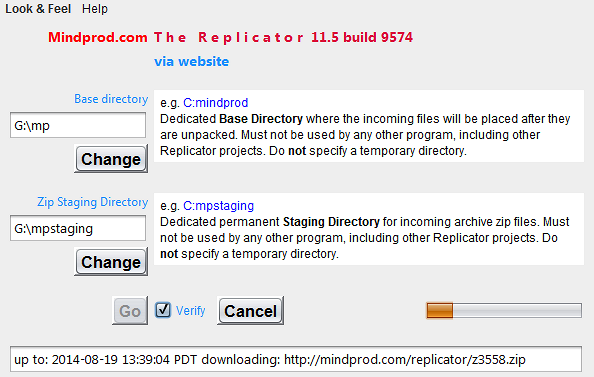
 .
. Get New Java
Get New Browser
Get New Java
Get New Browser
 ❘ precis
❘ manual
❘ screenshot
❘ browse source repository
❘ precis
❘ manual
❘ screenshot
❘ browse source repository
 2.5MB
zip for The Replicator Java source, compiled class files, jar and documentation to run on your own machine as a Java Web Start application.
2.5MB
zip for The Replicator Java source, compiled class files, jar and documentation to run on your own machine as a Java Web Start application.


