


| Co-ordinate Systems | Graphics2D |
| Off By One Gotcha | Rulers |
| Scaling Gotcha | Learning More |
| Relative Origin | Links |
| Discovering The Screen Size |
| Co-ordinate Systems | ||||
|---|---|---|---|---|
| Java Drawing | Cartesian | Polar | PostScript | Gore |
 |
 |
 |
 |
 |
Interconverting the various systems is easy for anyone who remembers their grade 11 trigonometry. The only one you might have difficulty with is polar to Cartesian and back. For that see the polar coordinates entry.
For Java, units are integer pixels. For PostScript units are floating point 1/72 of an inch, close to a printer’s point of 1/72.27 inch.
For mouse events, drawing geometric shapes and placing Components with absolute coordinates in the null layout, the origin 0,0 is the upper left corner.
When you place an object on the screen, you specify the location of its upper left corner. When drawing an ellipse, you would specify the position of the upper left corner of a bounding rectangle surrounding the ellipse, not the center of the ellipse. When placing text you specify the top left corner of where you want the text to appear.
The 0,0 upper left corner is hidden under the menu bar of a Frame or JFrame. You have to account for it and leave about 24 pixels of additional height in designing your layouts.
For GridBagLayouts the origin 0,0 is the upper left corner of the enclosing container, not the entire screen or the application JFrame. In GridBagLayouts the first coordinate GridBagConstraints.gridx measures columns — horizontal displacement to the right in cell widths and the second GridBagConstraints.gridy measures rows — vertical displacement downward in cells, GridBagLayout then adjusts the size of the various rows and columns and precisely positions components within the rough cells. The programmer usually does not work with precise placement. She uses layouts to specify relative position and allows the LayoutManager to compute the exact placement.
Routines often ask for the width and height of a bounding box, in that order. Ordinary English is confused about the usual order. We often say height and width, then describe the dimensions of a piece of paper as 8½ × 11 width × height.
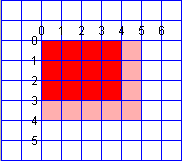
// draw a pink rectangle 4x3

gr.setColor( Color.PINK );

// x, y, width, height
gr.fillRect( 0, 0, 4, 3 );
And here is what you get: The red region represents the theoretical rectangle 4 x 3, and the pink rectangle shows what you actually get, 5 × 4 because the pen hangs down and the right of the theoretical line. The model is more suited to a pen plotter than a pixel display.
When you try do a setLocation on JFrames, or JWindows, you are working in screen coordinates, even when the JWindow has a parent. When you place Components, you are working in the coordinate system of its Container. The methods javax.swing.SwingUtilities.convertPoint, convertPointToScreen and convertPointFromScreen may be helpful then you are trying to convert between the coordinate systems of different components or the screen as a whole.
// You don't need SwingUtilities to do simple
// relative frame placement.
// Place daughterFrame a little to the right of motherFrame
int x = motherFrame.getX() + motherFrame.getWidth() + 40;
int y = motherFrame.getY();
daughterFrame.setLocation ( x , y );
 |
This page is posted |
http://mindprod.com/jgloss/coordinates.html |
Optional Replicator mirror
|
J:\mindprod\jgloss\coordinates.html | |
 |
Please read the feedback from other visitors,
or send your own feedback about the site. Contact Roedy. Please feel free to link to this page without explicit permission. | |
| Canadian
Mind
Products
IP:[65.110.21.43] Your face IP:[18.220.154.41] |
| |
| Feedback |
You are visitor number | |