| Introduction | Variants |
| USB Flash Drive | Clocking |
| Tips | Real Word USB Mounting Hardware |
| Main Connector Types | Futures |
| Internal USB Headers | Links |
USB (Universal Serial Bus). A way of connecting several low speed peripherals to a PC (Personal Computer) in a daisy chain. Typical peripherals include keyboards, scanners, mice and digital cameras. It runs at 1 Mbit/sec, roughly a tenth the speed of an Ethernet LAN (Local Area Network). It is rated to run at 12 Mbits per second and USB-2 is rated to run at 480 Mbits per second. USB-3 is rated to run at 5 GBits (5000 Mbits) per second. USB-3 cables are always blue.
USB has almost completely replaced serial and parallel ports for attaching keyboards, mice, cameras, webcams and other assorted devices.
Normally you don’t make your own USB cables. However, pre-built cables are expensive, comparable to the cost of much thicker Ethernet cables.
| Appearance | 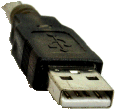 |
 |
 |
 |
|---|---|---|---|---|
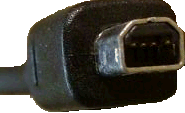
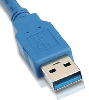
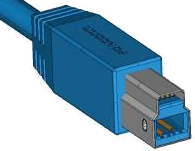
| Type | USB2-A male connector | USB2-B mini male connector | USB3-A male connector | USB3-B mini male connector |
| Where Used | Often used on desktop computers. | Often used on printers. | Just becoming common on desktop computers. | Just becoming common on printers. |
| Orientation | 

Insert the connector with the white plastic bar on the male down. When the slot is mounted vertically, the white bar goes on the left and the hole on the right. I am sure you can think of some obscene mnemonic or to help you remember this. Put a red dots with Sharpie fine tip permanent marker on the hole side of the cable connectors and on the hole side (top and right) of the slots so you won’t have to think about which way to insert. Just align the red dots. |
The rounded part of the D is usually up. |


Insert the connector with the blue plastic bar on the male down. When the slot is mounted vertically, the blue bar goes on the left and the hole on the right. Put a red dots with Sharpie fine tip permanent marker on the hole side of the cable connectors and on the hole side (top and right) of the slots so you won’t have to think about which way to insert. Just align the red dots. |
The small hump is usually up. |
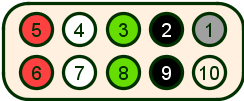
Usually most the USB connectors on you motherboard are not hooked up. Eight of them on my Asus motherboard just presented connectors on the motherboard like this that were useless as is:
|
| ||||||||||||||||||||||||||||||||||||||
The motherboard presents 9-pin male connectors for each pair of USB ports. You can buy an adapter to mount a female USB connector for a few dollars at your local geeky computer store to connect the headers to rear-mounted female USB connectors. You case may also have some front-mounted USB connectors you can hook up. Sometimes connectors have only 4 conductors. You can put two of them on the 9-pin headers so long as you make sure you match up the wire colours/pin assignments. The 9-pin connectors are preferable because they are keyed so you can’t put them on the wrong way.
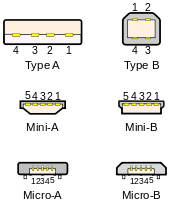
Not counting male/female and not counting internal headers and not counting USB-3, there are still eight variations on the USB connector. The main difference is size. You need a small connector for a small device such as a digital recorder. Personally, I think if was a mistake to invent the Mini-A, Mini-B and Micro-A connector. It was also a mistake not to make the full size A connector D shaped to make it easier to figure out which way up to insert it. It is too easy to damage them by inserting upside down. What were they thinking? Perhaps just manufacturing cost the extra component sales from damaged connectors.
|
|
| ||||||||||||||||||||||||||||||||||||||||||||||||||||||
This section is for techies. You don’t need to understand it to use USB. All USB provides is power and data, no clock. So how does the USB port know when to sample the data? In other words, how does USB tell a string of 1000 zeroes from 1001 zeroes? Earlier schemes such as SDLC (Synchronous Data Link Communication) and HDLC (High-level Data Link Control) embedded clocking information in the data stream by guaranteeing frequent dummy transitions. USB uses a much more efficient scheme, made possible by more accurate clocks that can be trusted to stay in sync for milliseconds at a time. The only clocking information available on the USB interface is that every millisecond, a specific type of data packet announces the start of a frame and this event is detected by the receiving hardware. This special packet has guaranteed transitions to help sender and receiver resync their clocks.
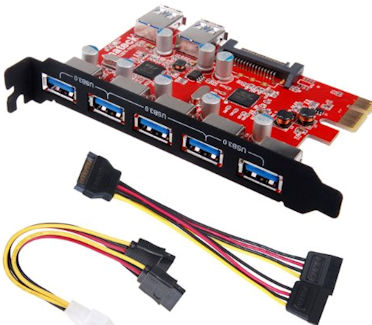 |
recommend electronic⇒Inateck Superspeed 7 Ports PCI-E to USB 3.0 Expansion Card | |||||||||||||||||||||||||||||||||||||||||||||
| asin | B00FPIMICA | |||||||||||||||||||||||||||||||||||||||||||||
|---|---|---|---|---|---|---|---|---|---|---|---|---|---|---|---|---|---|---|---|---|---|---|---|---|---|---|---|---|---|---|---|---|---|---|---|---|---|---|---|---|---|---|---|---|---|---|
| Other colour variants require different kinds of slot. If you have internal USB headers, you can use a card that does not need a motherboard slot. Two of the ports are internal, and would need their own mounting and cables. | ||||||||||||||||||||||||||||||||||||||||||||||
| ||||||||||||||||||||||||||||||||||||||||||||||
| Greyed out stores probably do not have the item in stock | ||||||||||||||||||||||||||||||||||||||||||||||
The biggest problem with USB is it hard to tell which way up it goes.
 embossed on the up side of the male connector. Unless
you have a good light, it is hard to see. It does not help you insert into a
vertical slot.
embossed on the up side of the male connector. Unless
you have a good light, it is hard to see. It does not help you insert into a
vertical slot.How might this be improved?
LibUSB is defunct leaving a hole if you want to write USB software.
 |
This page is posted |
http://mindprod.com/bgloss/usb.html |
Optional Replicator mirror
|
J:\mindprod\bgloss\usb.html | |
 |
Please read the feedback from other visitors,
or send your own feedback about the site. Contact Roedy. Please feel free to link to this page without explicit permission. | |
| Canadian
Mind
Products
IP:[65.110.21.43] Your face IP:[3.134.104.173] |
| |
| Feedback |
You are visitor number | |