


A microphone aka mike captures sound for your computer. Sometimes microphones are mounted near your mouth on a headset. Sometimes they sit on your desk. The quality of the microphone is measured by its sensitivity and by the range of frequencies it can pick up. You need very high quality for voice to text applications like Dragon Naturally Speaking.
Inside the PC (Personal Computer) case has a lot of electrical noise. You will hear the hum with even a high quality microphone. The way to solve this is to use a microphone with a USB (Universal Serial Bus) connector which avoids snaking the delicate analog signals inside the case.
Sometimes a microphone is noise cancelling. It electronically subtracts out sound coming from undesired directions.
Sometimes you want a microphone to pick up sound from all directions (e.g. a panel sitting around a table). Other times you want it to pick up sound from only one direction and filter out sound from all other directions (e.g. just you doing a webcast or Skype).
Hackers can surreptitiously turn on your microphone and spy on you. To defeat them you must disconnect your microphone.
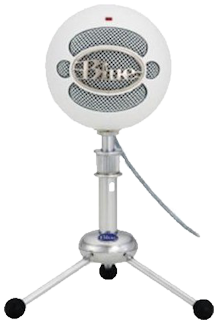 |
recommend electronic⇒Blue Microphones Snowball Ice USB Microphone (snowball Ice) | |||||||||||||||||||||||||||||||||||||||||||||
| asin | B00HX6O7TO | |||||||||||||||||||||||||||||||||||||||||||||
|---|---|---|---|---|---|---|---|---|---|---|---|---|---|---|---|---|---|---|---|---|---|---|---|---|---|---|---|---|---|---|---|---|---|---|---|---|---|---|---|---|---|---|---|---|---|---|
| suitable for music recording. | ||||||||||||||||||||||||||||||||||||||||||||||
| ||||||||||||||||||||||||||||||||||||||||||||||
| Greyed out stores probably do not have the item in stock | ||||||||||||||||||||||||||||||||||||||||||||||
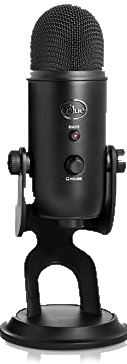 |
recommend electronic⇒Blue Yeti USB Microphone - Blackout Edition | |||||||||||||||||||||||||||||||||||||||||||||
| asin | B00N1YPXW2 | |||||||||||||||||||||||||||||||||||||||||||||
|---|---|---|---|---|---|---|---|---|---|---|---|---|---|---|---|---|---|---|---|---|---|---|---|---|---|---|---|---|---|---|---|---|---|---|---|---|---|---|---|---|---|---|---|---|---|---|
| dim | 12.45 × 11.94 × 29.46 cm 4.90 × 4.70 × 11.60 in | |||||||||||||||||||||||||||||||||||||||||||||
| USB connection. Comes in 10 colours. Recommmended for creating Youtube videos. 48 kHz/16-bit. Contains three condenser mikes. Driver in firmware. | ||||||||||||||||||||||||||||||||||||||||||||||
| ||||||||||||||||||||||||||||||||||||||||||||||
| Greyed out stores probably do not have the item in stock | ||||||||||||||||||||||||||||||||||||||||||||||
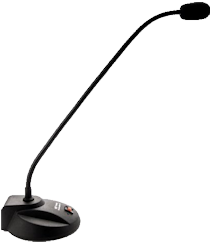 |
recommend electronic⇒Buddy DesktopMic 7G | |||||||||||||||||||||||||||||||||||||||||||||
| asin | B005XBBEWE | |||||||||||||||||||||||||||||||||||||||||||||
|---|---|---|---|---|---|---|---|---|---|---|---|---|---|---|---|---|---|---|---|---|---|---|---|---|---|---|---|---|---|---|---|---|---|---|---|---|---|---|---|---|---|---|---|---|---|---|
| Very good for text to speech. Filters out background noise. | ||||||||||||||||||||||||||||||||||||||||||||||
| ||||||||||||||||||||||||||||||||||||||||||||||
| Greyed out stores probably do not have the item in stock | ||||||||||||||||||||||||||||||||||||||||||||||
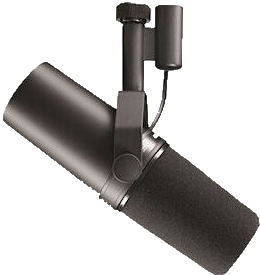 |
recommend electronic⇒Shure SM7B Vocal Dynamic Microphone, Cardioid | |||||||||||||||||||||||||||||||||||||||||||||
| asin | B0002E4Z8M | |||||||||||||||||||||||||||||||||||||||||||||
|---|---|---|---|---|---|---|---|---|---|---|---|---|---|---|---|---|---|---|---|---|---|---|---|---|---|---|---|---|---|---|---|---|---|---|---|---|---|---|---|---|---|---|---|---|---|---|
| This is a studio mike particularly good for recording deep voices. It needs a preamp. | ||||||||||||||||||||||||||||||||||||||||||||||
| ||||||||||||||||||||||||||||||||||||||||||||||
| Greyed out stores probably do not have the item in stock | ||||||||||||||||||||||||||||||||||||||||||||||
 |
This page is posted |
http://mindprod.com/bgloss/microphone.html |
Optional Replicator mirror
|
J:\mindprod\bgloss\microphone.html | |
 |
Please read the feedback from other visitors,
or send your own feedback about the site. Contact Roedy. Please feel free to link to this page without explicit permission. | |
| Canadian
Mind
Products
IP:[65.110.21.43] Your face IP:[3.131.13.37] |
| |
| Feedback |
You are visitor number | |


