

 and install a free copy of a special version of Xenu Link
Sleuth, or get a copy from my website
and install a free copy of a special version of Xenu Link
Sleuth, or get a copy from my website
First you spider your local copy of your website with Xenu. Read the Xenu documentation on how to do that. You first have to be sure XENU is working properly before BrokenLinks will work. Use XENU directly to find orphans.
Once you are pretty sure you have XENU configured correctly, run it on your local website, with external link checking turned on.
Download and install a free copy of Brokenlinks.
The first time you use BrokenLinks you must configure it by creating a text file with a text editor. It will look something like this:
Configure it according to the embedded comments. Then save the file, giving it a name of the form xxxx.properties.The properties are all pretty straightforward except for brokenForgivenessDays=7.
| BrokenLinks Files | ||
|---|---|---|
| file | type | Description |
| include.html | output⇒ | List of broken links that have remained broken for a number of days. In HTML format so that you can embed them in an HTML page to view and research them with a browser. |
| brokenlinks.csv | output⇒ | List of broken links that have remained broken for a number of days. In CSV (Comma-Separated Value) format. so that you can further process the file with the CSV utilities. |
| brokenlinks.properties | ⇒input | Master BrokenLinks configuration file. Names and locates other files. You might rename it to some other *.properties name. You specify the name of this file on the BrokenLinks command line. It contains links to the names and locations of the other files. |
| DESCRIPT.ION | ⇒input | Optional TCC (Take Command Command line) file descriptions for the TCC Describe program. |
| history.bin | ⇒input/output⇒ | Link checking history database. In binary, not human readable. It contains a records of all the links on your website, when they were last tested good and last tested bad, (echoes of Santa Claus). It gets updated each time you run BrokenLinks with information from the XENU spider and from BrokenLink’s own slower but more reliable tests. |
| permanentredirects.csv | output⇒ | URLs
that have been permanently redirected. You will likely want to update most of
these to the new value with CSVReplaceURLs. Most of the
redirects are:
|
| presumedgood.csv | ⇒input | Optional list of presumed good URLs that BrokenLinks will not check because they fail even though they are actually OK. |
| leave.csv | ⇒input | Optional list of URLs that BrokenLinks will not check because you know they are broken, but you don’t want to repair them just now. |
| report.txt | output⇒ | Report from BrokenLinks on how the last run went. |
| temporaryredirects.csv | output⇒ | URLs that have been temporarily redirected. You might want to update a few of these to the new value with CSVReplaceURLs. |
| xenupage.csv | ⇒input | Output from XENU version 1.3.9
beta that BrokenLinks uses for input,
created with Export Page Map to Tab separated File,
not Save. The special version of XENU you want is
available free.
from http://home.snafu.de/tilman/tmp/xenubeta.zip
or get a copy from my website:
Install it in X:\Program Files (x86)\Xenu.
(Older XENU versions will
not work, even older ones marked 1.3.9 beta.) Older
versions of BrokenLinks, version 2.4 and earlier,
used an older version of XENU. |
| _O_V_E_R_V_I_E_W.txt | generated by Take Command | An optional one-line description of each file. |
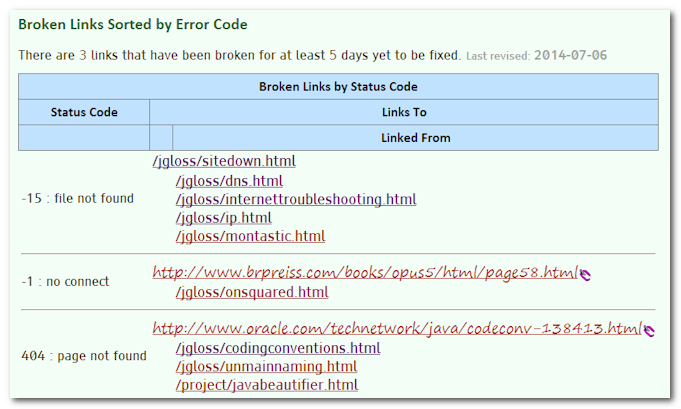
You will get a report of the critical broken links to research both in text and html form in files in the current directory. Embed the html in a web page somewhere. Here is my list of broken links for mindprod.com. The layout is designed so make it easy to research the problems. You can click to get the page where the broken link is, or click to where it was trying to go.
Then research the broken links and fix them. The run XENU again, click Export Page Map to TAB-separated File and run BrokenLinks. Run this cycle at different times of the day, since some websites shutdown part of the day for maintenance. You want to catch them when they are up. Run the cycle after repairing a batch of links to see how you did. After you get the list whittled down to none, run the cycle weekly, twice weekly or daily to stay on top of the broken links. I find running it daily works best since you never get overwhelmed with work and thus are not tempted to postpone the work.
If you are pressed for time, you an also rerun BrokenLinks without a new XENU run. This will catch most of the problems you would rerunning XENU, but not all.
If you erase the history.bin file, it will automatically start over from scratch collecting history.
It is best to run BrokenLinks at various times of day so that you won’t think a site is down that is just offline for an hour each day for backup. I am a bit compulsive. I run it twice a day.
There are 7 links that have been broken for at least 5 days yet to be fixed. Last revised: 2014-04-03
| Broken Links by Status Code | ||
|---|---|---|
| Status Code | Links To | |
| Linked From | ||
| 500 : Internal server error | http://old.richarddawkins.net/articles/3534 | |
| /quote/religion.html | ||
| 500 : Internal server error | http://old.richarddawkins.net/articles/511240-religious-outlier | |
| /quote/religionbyroedy.html | ||
| 500 : Internal server error | http://old.richarddawkins.net/videos/3373-why-we-believe-in-gods | |
| /religion/books.html /religion/god.html | ||
| 500 : Internal server error | http://old.richarddawkins.net/videos/3410-richard-dawkins-interviews-father-george-coyne | |
| /religion/god.html | ||
| 500 : Internal server error | http://old.richarddawkins.net/videos/3414-richard-dawkins-interviews-derren-brown | |
| /quote/religionbyroedy.html | ||
| 500 : Internal server error | http://old.richarddawkins.net/videos/486298-christianity-debate | |
| /religion/kristianity.html | ||
| 500 : Internal server error | http://old.richarddawkins.net/videos/512601-drunk-on-religion | |
| /religion/kristianity.html | ||
The following links are known to be broken, but they are deliberately not being repaired for now.
There are 8 links marked to be left as is. Last revised: 2014-04-03
Xenu claims the following links are broken, but they have been manually found to be good. They should be manually rechecked from time to time. The problem may be an unknown SSL certificate authority which needs to be OKed manually, (a missing/unknown/uninstalled certificate root authority) or it may be the website sends the data, but with not-found status.
There are 53 links marked as presumed good despite what Xenu says. Last revised: 2014-04-03
SSL (Secure Sockets Layer) certificate authority which needs to be OKed manually, (a missing/unknown/uninstalled certificate root authority) or it may be the website sends the data, but with not-found status.
There is a similar file called leave.csv. presumedgood.csv is for sites/links that actually working, but for some reason Xenu or Brokenlinks thinks they are broken, most commonly because of problems with SSL. leave.csv is for sites/links that are definitely broken, but which you do not want to bother fixing just now.
BrokenLinks can automatically repair permanently redirected URLs. Websites often reorganise and leave behind tombstones on the old page that describe where the information is now. Your browser will automatically follow these chains to find the new information. You know this has happened when the URL displayed when the page in found does not match the original. It is best to update your web pages with the new link since they browse faster by going direct to the link and because they will continue to work if the tombstone is deleted.
BrokenLinks has a feature to automatically maintain these changes for you. BrokenLinks automatically exports a redirects.csv CSV file that gives the old URL, the new URL, and the pages where the old URL appears. It is best to manually examine this list to prune any changes you don’t want to apply, e.g. Yahoo’s replacement links that go preposterously on and on and one. Then use CSVReplaceURLs to process that file and apply the changes to your local website mirror. Best take a backup before you try it out. If you generate URLs with code, import them from databases, CSVReplaceURLs will correct your website and its HTML macros embedded in comments, so the your changes will not will be undone the next time your regenerate your HTML. CSVReplaceURLs can deal with & encoded in the replacing URLs as either & or &, but it expects & to be encoded as & in the website. It also works when one URL has a trailing / and the candidate match does not.
You can use the CSVRecode utility to automatically replace URLs in CSV files as well.
Here is the TakeCommand script I use to run BrokenLinks, automatically discard some of the redirects I won’t apply, let me edit the list of both permanent and temporary links and also use them to update two CSV files, hassle.csv and air.csv.
I also scan the temporary redirects looking for redirects to pages with names containing words like error or suspended. I then manually check these out. Usually it means the website owner has not paid his ISP (Internet Service Provider) bills and the account has been suspended. Sometimes sites have died, or not paid bills and the owner or ISP redirects them to another living site, sometimes the ISP ’s or someone else’s parking site. He should use a permanent redirect, but uses a temporary one instead. I can catch these by eyeballing the list. The list is mostly just internal housekeeping junk, so I don’t scan it carefully every day. It sometimes contains broken links masquerading as temporary redirects or permanent redirects masquerading as temporary redirects.
rem run csvreplaceurls to update all the redirected URLS on a website
java.exe J:\com\mindprod\csv\csvreplaceurls.jar  E:\redirects.csv
You don’t have to tell CSVReplaceURLs where your local website mirror is. The names of the files that need changing are in redirects.csv. You told it earlier when you configured BrokenLinks where your website files were and you also told XENU.
You might want to repair some of the links manually. You want to make sure the new link truly points to the original information, not some parking page. Just prune the ones you want to ignore or handle manually and feed the remainder to CSVReplaceURLs
CSVReplaceURLs presumes all your URLs are pure lower case. It won’t find them if they are mixed or all upper case, (except for the tail end path part). Some validator programs will complain about URLS not in all lower case. You can condition your website to use all lower case URLs by running TidyURLs.
TidyURLs will clean up the links on your website, making sure they are lower case (just the host part). They will put quotes around URLs that are missing them. It will replace spaces in URLs with %20. There are many other cleanups and validations. l It is a command line utility that allows the switches -s for subdirectories too, -q for quiet, -v for verbose, -dry for dry run (does not actually change your files, just tells you what it would do if the -dry option were not there. It allows you to specify which files or file trees you want to process. It automatically ignores all files except *.html files. Here is how you typically use it:
I don’t expect you to follow all the detail, but here is what I do myself in postprocessing with a Take Command script. It gives you an idea of the sort of thing you can do.
In my own use of BrokenLinks, it has never misbehaved, so there is not much I can say about troubleshooting.
It works by processing all its information about links in RAM (Random Access Memory). If you had a large website, you might run out of RAM. If that happened, use a 64-bit OS (Operating System) and use the 64-bit version of Java. Make sure you have plenty of RAM and a fat pagefile.sys for virtual RAM. Then adjust the java.exe command line parameters, doubling the various RAM requesting parameters. If you have trouble, email me and I will coach you through it.
| Package | Version | Released | Licence | Language | Notes | ||
|---|---|---|---|---|---|---|---|
 BrokenLinks |
3.1 | 2017-03-15 | free | Java |  ❘ precis
❘ manual
❘ screenshot
❘ browse source repository
❘ precis
❘ manual
❘ screenshot
❘ browse source repository
for the current version of BrokenLinks. find and track persistently broken links on your website. Back end to Xenu Link Sleuth. Also includes utility to tidy URLs on a website, and updates redirected links.
2.2MB
zip for BrokenLinks Java source, compiled class files, jar and documentation to run on your own machine as an application.
Runs on any OS that supports Java e.g. W2K, XP, W2003, Vista, W2008, W7-32, W7-64, W8-32, W8-64, W2012, W10-32, W10-64, Linux, LinuxARM, LinuxX86, LinuxX64, Ubuntu, Solaris, SolarisSPARC, SolarisSPARC64, SolarisX86, SolarisX64 and OSX. First install the most recent Java. To install, extract the zip download with WinZip, (or similar unzip utility) into any directory you please, often J:\ — ticking off the use folder names option. To check out the corresponding source from the Subversion repository, use the TortoiseSVN repo-browser to After you have installed the jar, you can run it as an application. Type: java -jar J:\com\mindprod\brokenlinks\brokenlinks.jar parms
adjusting as necessary to account for where the jar file is. download ASP PAD XML program description for the current version of BrokenLinks. BrokenLinks is free. Full source included. You may even include the source code, modified or unmodified in free/commercial open source/proprietary programs that you write and distribute. Non-military use only. |
||
 |
This page is posted |
http://mindprod.com/application/brokenlinks.manual.html |
Optional Replicator mirror
|
J:\mindprod\application\brokenlinks.manual.html | |
 |
Please read the feedback from other visitors,
or send your own feedback about the site. Contact Roedy. Please feel free to link to this page without explicit permission. | |
| Canadian
Mind
Products
IP:[65.110.21.43] Your face IP:[18.118.9.7] |
| |
| Feedback |
You are visitor number | |