The JDisplay Java Applet
displays the large program listings on this web page.
JDisplay requires an up-to-date
browser and Java version
1.8+, preferably 1.8.0_131.
If you can’t see the listings, or if you just want to learn
more about JDisplay, click
Use Firefox for best results.
Introduction
JDisplay It started out as a way to display Java
source code listings in a variety of colours, fonts, sizes and weights to help make them
more presentable and readable on a website. Then I expanded it to handle HTML (Hypertext Markup Language), bat, btm, SQL (Standard Query Language), ini, csv and *.properties files. Then I expanded it
further the handle mft, sf,
mf and http files.
Why would you use it? For the same sorts of reasons you use colours and fonts in an
IDE (Integrated Development Environment) like IntelliJ or Eclipse. They make your code much easier
to understand for visitors to your website. The techniques used are more much more
efficient of bandwidth than displaying images.
There is no server-side code used. Java utilities parse the code snippets into compact
binary tokens, assigning colours, fonts, sizes and weights to each token. The tokens are
compressed with GZIP and stored in *.ser files. These are not as
compact as the original text since they include colourising information for each chunk of
text. They are usually more compact that the equivalent formatted
HTML, but for
very small files they can be bigger because of the serialization overhead of all the
fully qualified token class names for the various types of token at the head of the
*.ser files. Then the tokens can be rendered three ways:
using a Java Applet. This is usually best for very large listings.
as piece of CSS (Cascading Style Sheets) style-decorated
HTML code you
include in your html as an iframe. This is usually best for intermediate listings.
inline in your HTML. This is usually best for short listings. The problem,
in the process of editing the html it is fairly easy to damage the generated listings.
They must be regenerated before every upload.
I have been using the JDisplay suite of utilities for many years. I did not write it
for public use. I offer it on an as-is basis. The code itself in well documented, but
there is no step-by-step documentation on getting it to work.
I presume the user is familiar with bat and ant files and Java building.
I have not included the enormous HTML
static
macros package which I use for deciding the sizes and display rendering method for each
snippet, though I did include the code to make those decisions hooked into your own
framework. At some point in the near future I will make the htmlmacros package available
for download separately.
The parsers are rough and ready. They need to work on code snippets and erroneous
code, not perfect code the way a standard parser does. If improve the parsers, or add new
ones, please pass them along for the public distribution.
JDisplay is enormously more complicated than it appears on the surface. You can
spelunk and discover all manner of interesting code you can cannibalise. There are finite
state machines, clipregion sensitive Canvas rendering,
HTML generators,
ObjectStreams…
Advantages
You can render three different ways: Applet, inline, or iframe.
uses CSS not
old-fashioned <font tags.
works on snippets with syntax errors.
does some cleverer things than usual e.g. bold where a symbol is defined, variable
size matching () {}, grouping numerics in 3s or 4s with subtle colour differences
has parsers for HTML, SQL
etc, not just
Java.
it has been extended by a third party to colourise code snippets in Javadoc.
For large listings, with Applet rendering, it is more efficient than
HTML since it
transmits a compressed binary token stream.
part of a large static macros package to expand macros embedded in
HTML before
the files are uploaded to the server.
com.mindprod.hunkio
does IO in big hunks.
com.mindprod.jdisplayaux
static macro to decide which of three ways to render a given snippet and
inserts the appropriate HTML to do that into your HTML.
com.mindprod.jdisplayorphans
detects orphans not referenced by any of your HTML.
com.mindprod.jprep
parses the snippets of code, producing binary *.ser
files.
com.mindprod.jtokens
Tokens and parsers for various languages rendered.
mindprod.css
style sheet that controls the fonts/tokens/sizes
Program Flow
Run jprep to parse snippets to binary *.ser files and iframe/*.html files.
Manually decide which of three methods to use and insert the appropriate
HTML. (or rig
up some code to do this automatically using code in JDisplayAux). To see what the
embedded HTML looks like see Java Presenter Student Project which describes
how JDisplay works inside. This HTML
was
generated with static macros. You might do the same, or compose the embedded
HTML
directly.
Upload to website.
View code inline, as iframe, or via invocation of JDisplay Applet.
Examples
Listing expanded inline as HTML
with
classes for each token. Style sheet mindprod.css controls
the colour, font, size and weight. HTML
looks
like this:
The display looks like this:
Listing using a separate iframe in HTML
with
classes for each token. Style sheet mindprod.css controls the
colour, font, size and weight. The HTML
to include
an iframe JDisplay looks like this:
The display itself looks like this:
Listing using the JDisplay Applet to render a *.ser binary
token file. The HTML to invoke an Applet to display the JDisplay binary token
*.ser file looks like this:
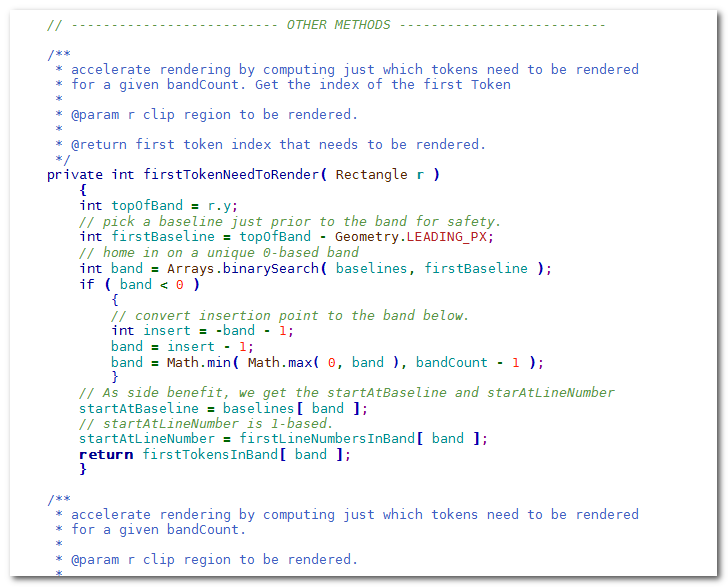
The display itself looks like this:
Prerequisites
Java Requirements and Troubleshooting
JDisplay
is a signed Java Applet
to Program Listing Display.
You are welcome to install it on your own website.
If it does not work…
For this Applet to work, you must click grant/accept/always run on this site/I accept the risk
to give it permission to let it read the decorated text to display from a file on the server.
If you refuse to grant permission, the program may crash with an inscrutable stack dump
on the console complaining about AccessController.checkPermission.
In the Java Control Panel security tab,
click Start ⇒ Control Panel ⇒
Programs ⇒ Java ⇒ Security, configure medium security
to allow self-signed and vanilla unsigned applets to run.
If medium is not available, or if Java security is blocking you from running the program,
configure high security
and add http://mindprod.com
to the Exception Site List at the bottom of the security tab.
Often problems can be fixed simply by clicking the reload button on your browser.
Make sure you have both JavaScript and Java enabled in your browser.
Make sure the Java in your browser is enabled in the security tab of the Java Control panel.
Click Start ⇒ Control Panel ⇒
Programs ⇒ Java ⇒ Security ⇒
Enable Java Content in the browser.
This signed Java Applet
needs 32-bit or 64-bit Java 1.8 or later.
For best results use the latest 1.8.0_131 Java.
It works under any operating system that supports Java
e.g. W2K, XP, W2003, Vista, W2008, W7-32, W7-64, W8-32, W8-64, W2012, W10-32, W10-64, Linux, LinuxARM, LinuxX86, LinuxX64, Ubuntu, Solaris, SolarisSPARC, SolarisSPARC64, SolarisX86, SolarisX64 and OSX
Make sure your zoom is on normal 100% to give the Applet room to run.
You should see the Applet above looking much like this
screenshot.
If you don’t, the following hints should help you get it working:
If the above Applet appears to freeze-up, click
Alt-Esc repeatedly to check for any buried permission dialog box.
If you have certificate troubles,
check the installed certificates
and remove or update any obsolete or suspected defective certificates.
The only certificate used by this program is mindprodcert2017rsa.cer.
Especially if this Applet has worked before, try clearing the browser cache and rebooting.
To ensure your Java is up to date, check with Wassup.
First, download it and run it as an application independent of your browser,
then run it online as an Applet to add the complication of your browser.
If the above Applet does not work,
check the Java console for error messages.
If the above Applet does not work, you might have better luck with the downloadable version available below.
If you are using Mac OS X and would like an improved Look and Feel,
download the QuaQua look & feel
from randelshofer.ch/quaqua.
UnZip the contained quaqua.jar
and install it in ~/Library/Java/Extensions
or one of the other ext dirs.
Upgrade to the latest version of Internet Explorer or another browser.
Click the Information bar, and then click Allow blocked content. Unfortunately, this also allows dangerous ActiveX code to run. However, you must do this in order to get access to perfectly-safe Java Applets running in a sandbox. This is part of Microsoft’s war on Java.
Try upgrading to a more recent version of your browser,
or try a different browser e.g. Firefox, SeaMonkey, IE or Avant.
If you still can’t get the program working
click the red HELP button below for more detail.
If you can’t get the above Applet working
after trying the advice above and from the red HELP button below,
have bugs to report or ideas to improve the program or its documentation,
please send me an email at.
To install, extract the zip download with WinZip,
(or similar unzip utility) into any directory you please,
often J:\ — ticking off the
use folder names option.
To check out the corresponding source from the Subversion repository, use the TortoiseSVN repo-browser to access jdisplay source in repository with [Tortoise] Subversion client on wush.net/svn/mindprod/com/mindprod/jdisplay/.
JDisplay is free. Full source included.
You may even include the source code, modified or unmodified
in free/commercial open source/proprietary programs that you write and distribute. Non-military use only.
Directory Structure
Let’s say your html lives in:
E:\mindprod\jgloss
Then the corresponding program listing snippets will live in:
E:\mindprod\jgloss\snippet
the generated *.ser files live in
E:\mindprod\jgloss\snippet\ser
and the generated iframe *.html files will live in
E:\mindprod\jgloss\snippet\iframe
All off this must be uploaded to your website.
Resolving Problems
All code should be included with the exception of the
htmlmacros package. If you find something missing you can
probably download it. In any case, please let me know, so
I can include it.
If you have questions, please feel free to ask at
.
It will help me put together some minimalist
documentation. If you are interested in using JDisplay in other contexts (e.g. without
htmlmacros), I will be willing to help and write interfacing
code at no charge. One PhD student from Germany has used JDisplay to automatically
colourise source code listings embedded in Javadoc. He has not yet publicly released the
code. I wrote JDisplay originally primarily to demonstrate my vision of the future of
what program listings should look like in advanced editors that I call SCIDs. I would love to see JDisplay-like logic in an
IDE
editor.
Please read the feedback from other visitors,
or send your own feedback about the site. Contact Roedy.
Please feel free to link to this page without explicit permission.
Canadian
Mind
Products
IP:[65.110.21.43]
Your face IP:[3.134.85.87]


 Use Firefox for best results.
 .
. Get New Java
Get New Browser
Get New Java
Get New Browser
 ❘ precis
❘ screenshot
❘ browse source repository
❘ precis
❘ screenshot
❘ browse source repository
 4.2MB
zip for JDisplay Java source, compiled class files, jar and documentation to run on your own machine as an Applet.
4.2MB
zip for JDisplay Java source, compiled class files, jar and documentation to run on your own machine as an Applet.